LinkedIn API: How to Post to Profiles and Company Pages
The Posts API replaced UGC Posts, changing how you register media, version requests, and address company pages. Covers the OAuth flow, image and video upload with working code, editing and deleting posts, and why a 403 is a coin flip between a missing scope and a missing page role.
Posting to LinkedIn through an API looks straightforward in a demo:
- get an access token,
- send text to an endpoint,
- receive a post ID.
That flow is real. It is also about 20% of the work required for a production integration.
The remaining 80% is permissions, company page roles, author URNs, media registration, upload state, API version headers, scheduling, token handling, error recovery, and explaining to customers why they can see a Page in LinkedIn but cannot publish to it through your application.
This guide explains the current LinkedIn posting workflow for personal profiles and company pages, shows where the implementation becomes annoying, and demonstrates a simpler route through bundle.social.
TL;DR: LinkedIn's current versioned Posts API uses
POST https://api.linkedin.com/rest/posts. Personal publishing generally requiresw_member_social. Company page publishing requiresw_organization_socialand an eligible Page role. Images, videos, and documents must be uploaded first and referenced by their LinkedIn URNs. LinkedIn does not become a scheduler just because you can create a post; your application still needs a queue and reliable worker system.
Which LinkedIn API should you use?
LinkedIn currently documents the versioned Posts API as the main API for creating and retrieving organic and sponsored posts:
POST https://api.linkedin.com/rest/posts
LinkedIn also states that the Posts API replaces the older ugcPosts API for current Marketing API integrations.
You will still find many tutorials built around:
POST https://api.linkedin.com/v2/ugcPosts
Those tutorials can help explain the old data model, but new production work should follow LinkedIn's latest documentation and supported API version.
Every versioned request needs these headers:
Authorization: Bearer YOUR_ACCESS_TOKEN
 Linkedin-Version: 202607
 X-Restli-Protocol-Version: 2.0.0
 Content-Type: application/json
The exact supported version changes over time. LinkedIn releases Marketing API versions monthly and supports them for a limited lifecycle. Hard-coding a version and forgetting about it is a reliable way to create a future incident.
Personal profiles and company pages are different authors
A LinkedIn post has an author.
For a personal profile, the author is a person URN:
urn:li:person:PERSON_ID
For a company page, the author is an organization URN:
urn:li:organization:ORGANIZATION_ID
Your UI should make this difference explicit. “Connect LinkedIn” is not enough information for users managing both their own profile and several company pages.
A personal profile connection answers:
Which member is publishing?
A company page connection must also answer:
Which organization is publishing, and does this member have a role that allows it?
If your data model stores only one generic LinkedIn account ID, you will eventually have trouble with page selection, permissions, analytics, and reconnection.
Permissions required for LinkedIn posting
Personal profile posting
Publishing on behalf of the authenticated member generally requires:
w_member_social
LinkedIn provides this through the Share on LinkedIn product.
The permission allows the application to post, comment, and react on behalf of the authenticated member. It does not automatically grant broad read access to the member's entire content history. Some read permissions are restricted and require approval.
Company page posting
Publishing on behalf of an organization requires:
w_organization_social
The authenticated member must also hold an eligible role on that Page. LinkedIn currently lists roles such as:
ADMINISTRATOR,DIRECT_SPONSORED_CONTENT_POSTER,CONTENT_ADMIN.
A valid token is not enough if the person lacks the required organization role. Product, scope and role are three separate axes, and LinkedIn API permissions reads a 403 back through all three.
This distinction causes many support tickets. Customers say, “I am connected to LinkedIn, so why can I not post to the Page?” The answer is often that OAuth succeeded for the member, but organization access is missing or insufficient.
Creating a basic text post
A direct organization text post can look like this:
const response = await fetch("https://api.linkedin.com/rest/posts", {
  method: "POST",
  headers: {
    Authorization: `Bearer ${process.env.LINKEDIN_ACCESS_TOKEN}`,
    "Linkedin-Version": "202607",
    "X-Restli-Protocol-Version": "2.0.0",
    "Content-Type": "application/json",
  },
  body: JSON.stringify({
    author: "urn:li:organization:123456789",
    commentary: "We just shipped a cleaner reporting workflow.",
    visibility: "PUBLIC",
    distribution: {
      feedDistribution: "MAIN_FEED",
      targetEntities: [],
      thirdPartyDistributionChannels: [],
    },
    lifecycleState: "PUBLISHED",
    isReshareDisabledByAuthor: false,
  }),
});

if (!response.ok) {
  const errorBody = await response.text();
  throw new Error(`LinkedIn post failed: ${response.status} ${errorBody}`);
}

const postUrn = response.headers.get("x-restli-id");
The request is not especially complicated. Correctly obtaining the author, permission, Page role, token, and version is the bigger job.
Images, videos and documents require separate uploads
LinkedIn does not accept a random public image URL inside the post request and handle everything for you.
For rich media, the general flow is:
- initialize or register an upload,
- upload the binary file,
- wait for or verify the asset state where required,
- receive an asset URN,
- reference that URN in the post.
LinkedIn uses different media identifiers:
urn:li:image:...
 urn:li:video:...
 urn:li:document:...
A video post references a video URN. A document post references a document URN. An image post references an image URN.
This means your application needs a media state machine in addition to a post state machine. A file can fail before the post is created. A video can upload but still be processing. The final post request can fail even after the media upload succeeds.
You need to store enough context to distinguish these failures. Returning “LinkedIn post failed” for all of them will make your users hate the integration and your support team hate you.
Supported LinkedIn post types
The current Posts API documentation includes organic support for:
- text,
- images,
- videos,
- documents,
- articles,
- multi-image posts,
- polls,
- celebration posts.
There are important exceptions. For example, organic carousel posts are not supported in the same way as sponsored carousels. LinkedIn's terminology can also be confusing because a multi-image organic post and an advertising carousel are different products.
Do not expose every content type in one generic form and hope LinkedIn accepts it. Build platform-aware validation.
Link previews are not just URL scraping
Older social integrations often paste a URL and wait for the platform to scrape a title, description, and image.
LinkedIn's current Posts API documentation says article post creation does not support URL scraping through the API because the final appearance would be unpredictable. API partners should provide article fields such as:
- source URL,
- title,
- description,
- thumbnail image URN.
This gives you more control, but it also means your backend may need to fetch Open Graph metadata, let the user edit it, upload a thumbnail, and construct the article object.
Again, the final post request is the easy part.
LinkedIn scheduling is your responsibility
The Posts API publishes posts. It does not remove the need for your own scheduling infrastructure.
To schedule a post for next Tuesday, your system normally needs to:
- store the draft and intended publication time,
- validate the content before the deadline,
- enqueue a job,
- run the job at the correct time zone-aware moment,
- confirm the token and Page are still valid,
- upload or reference media,
- call LinkedIn,
- store the resulting post URN,
- retry only when the failure is safe to retry,
- notify the user if publication ultimately fails.
A cron expression plus one database row is fine for a prototype. It becomes risky when thousands of customer posts are scheduled for the same hour.
Posts API or UGC Posts API?
If you are reading older tutorials you will hit /v2/ugcPosts. That is the previous generation. The current API is /rest/posts, and the two are not interchangeable.
| UGC Posts (legacy) | Posts API (current) | |
|---|---|---|
| Endpoint | /v2/ugcPosts | /rest/posts |
| Versioning | Unversioned | Linkedin-Version: YYYYMM header, required |
| Text field | specificContent.com.linkedin.ugc.ShareContent.shareCommentary.text | commentary |
| Media reference | media[].media with asset URN | content.media.id with image/video URN |
| Asset upload | Assets API (/v2/assets) | Images API / Videos API |
| Visibility | visibility.com.linkedin.ugc.MemberNetworkVisibility | visibility |
The practical migration notes:
- Field paths collapse dramatically. The deeply nested
specificContentobject becomes flat fields. This is the bulk of the work and it is mechanical. - The Assets API is replaced by the Images API and Videos API. Different endpoints, different response shapes, and - importantly - different upload mechanics for video.
- Versioning becomes mandatory. Every request carries
Linkedin-VersioninYYYYMMform. Omit it and the call fails. - Post URNs still come back as
urn:li:share:...orurn:li:ugcPost:..., so stored IDs from the legacy API remain addressable.
LinkedIn sunsets versions on a rolling basis - the April 2025 marketing version is already retired - so pinning a version and forgetting about it is not an option. Put a recurring reminder on the calendar.
Scopes and the approval you cannot skip
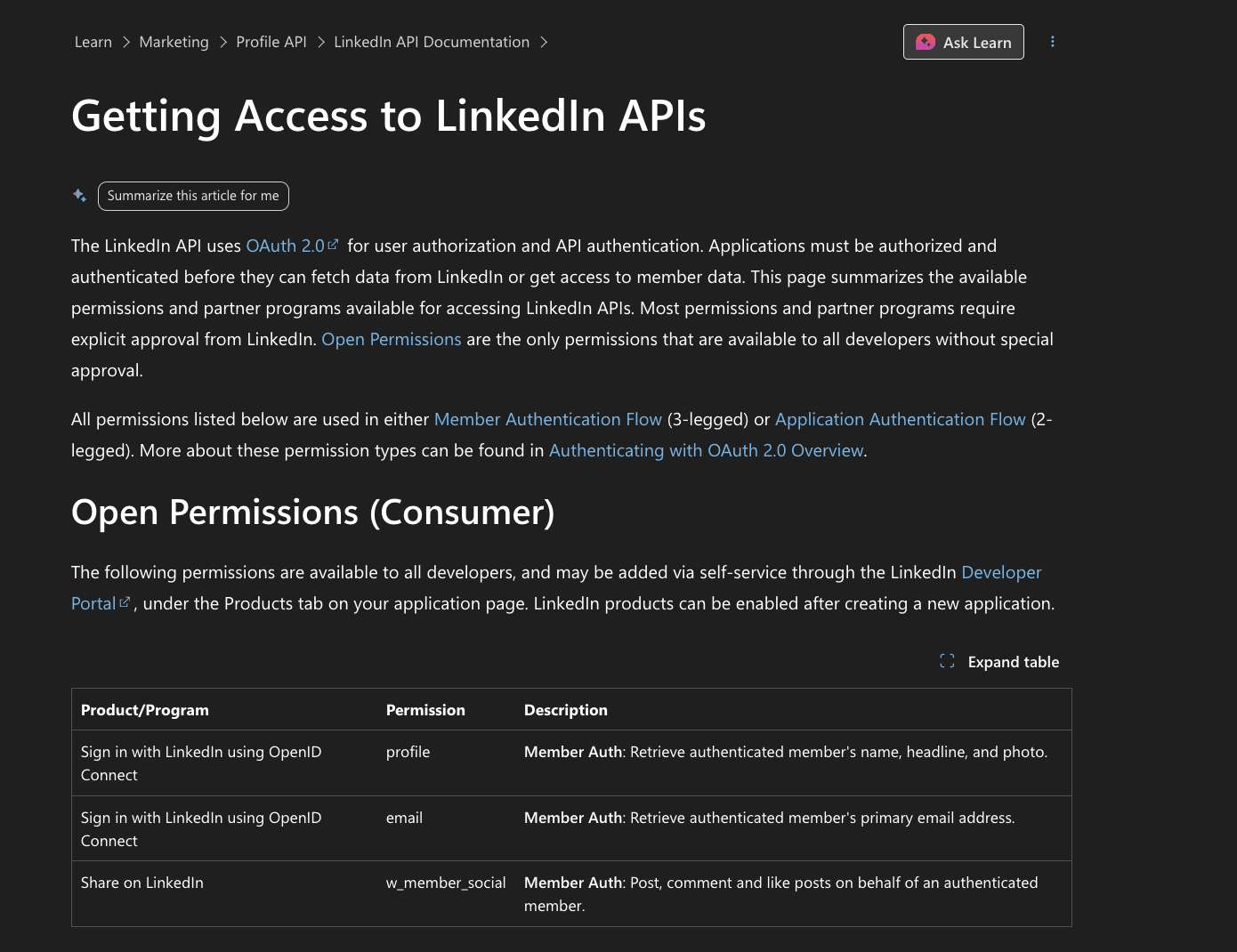
Four scopes matter for publishing and reading:
| Scope | Grants |
|---|---|
w_member_social | Publish as the authenticated member |
w_organization_social | Publish as a company page |
r_member_social | Read the member's posts |
r_organization_social | Read the company page's posts |
Getting them is the hard part. w_member_social is available through the Share on LinkedIn product with a relatively light review. w_organization_social requires the Community Management API, and that is a partner programme with a real application, not a checkbox.
What the application actually asks for:
- A verified LinkedIn company page for your business, not your customer's
- A working demo of the integration
- A clear description of who uses it and why they need page-level publishing
- Confirmation that you are not building a scheduling tool that competes with LinkedIn's own
That last point is worth taking seriously. Applications get rejected for being generic schedulers. Positioning matters: an integration that publishes as part of a broader product workflow reads differently from a standalone scheduler, even when the API calls are identical.
Timelines run from a couple of weeks to a couple of months, and rejections come with limited feedback. Build against w_member_social first so you are not blocked, and treat page publishing as a phase two.
There is a second gate people miss. Even with the scope granted, the authenticated member must hold an appropriate role on the company page. A perfectly scoped token from someone who is not a page admin returns 403 ACCESS_DENIED. Surface that at connection time by checking the member's page roles, not at publish time.
Getting credentials and running the OAuth flow
Before any of this works you need an app. In the LinkedIn Developer portal, create one, associate it with a LinkedIn company page you control, request the products you need (Share on LinkedIn, Sign In with LinkedIn, Community Management API), and register your redirect URL. The redirect must match exactly - trailing slashes count.
Step 1: send the user to the authorization URL
GET https://www.linkedin.com/oauth/v2/authorization
  ?response_type=code
  &client_id={your_client_id}
  &redirect_uri={your_callback_url}
  &state={csrf_token}
  &scope=w_member_social%20r_basicprofile
state is not optional in practice - it is your CSRF protection, and you must verify it matches on the way back.
Step 2: exchange the code for a token
LinkedIn redirects to your callback with ?code=...&state=.... Exchange it server-side:
curl -X POST 'https://www.linkedin.com/oauth/v2/accessToken' \
  -H 'Content-Type: application/x-www-form-urlencoded' \
  -d 'grant_type=authorization_code' \
  -d "code=${AUTH_CODE}" \
  -d "client_id=${CLIENT_ID}" \
  -d "client_secret=${CLIENT_SECRET}" \
  -d "redirect_uri=${REDIRECT_URI}"
The authorization code is single-use and short-lived. If your callback handler retries on failure, the second attempt fails - handle the exchange idempotently.
Step 3: refresh before expiry
curl -X POST 'https://www.linkedin.com/oauth/v2/accessToken' \
  -H 'Content-Type: application/x-www-form-urlencoded' \
  -d 'grant_type=refresh_token' \
  -d "refresh_token=${REFRESH_TOKEN}" \
  -d "client_id=${CLIENT_ID}" \
  -d "client_secret=${CLIENT_SECRET}"
{
  "access_token": "BBBB2kXITHELmWblJigbHEuoFdfRhOwGA0QNnumBI8XOVSs0...",
  "expires_in": 86400,
  "refresh_token": "AQWAft_WjYZKwuWXLC5hQlghgTam-tuT8CvFej9-XxGyqeER...",
  "refresh_token_expires_in": 439200,
  "scope": "r_basicprofile"
}
Read expires_in and refresh_token_expires_in from the response and store them. Do not hardcode durations you found in a tutorial - including this one. The values differ by product and grant type, and LinkedIn changes them. Every refresh returns a fresh pair, so persist both.
Two operational details that bite later:
Refresh tokens are not granted by default. They require approval. Without them, every connection needs the user to re-authorise when the access token expires - which is the real cause of most "our LinkedIn integration stopped working" reports. Confirm whether your app has them before you design the connection lifecycle.
Plan for ~1000-character tokens. LinkedIn's own guidance is that refresh tokens run around 500 characters and applications should handle at least 1000 to accommodate future growth. A VARCHAR(255) column will silently truncate and produce authentication failures that look like revocation.
Start prompting for re-authorisation well before expiry rather than at it. Silent expiry means a customer's scheduled posts fail with no warning. The cross-platform version of this problem is covered in OAuth token refresh across social APIs.
Your first post
Three headers are mandatory on every call:
Authorization: Bearer {token}
X-Restli-Protocol-Version: 2.0.0
Linkedin-Version: 202604
Text-only post:
curl -X POST 'https://api.linkedin.com/rest/posts' \
  -H "Authorization: Bearer ${TOKEN}" \
  -H 'X-Restli-Protocol-Version: 2.0.0' \
  -H 'Linkedin-Version: 202604' \
  -H 'Content-Type: application/json' \
  --data '{
    "author": "urn:li:organization:5515715",
    "commentary": "Sample text Post",
    "visibility": "PUBLIC",
    "distribution": {
      "feedDistribution": "MAIN_FEED",
      "targetEntities": [],
      "thirdPartyDistributionChannels": []
    },
    "lifecycleState": "PUBLISHED",
    "isReshareDisabledByAuthor": false
  }'
The response body is empty. You get a 201, and the post URN arrives in the x-restli-id response header:
x-restli-id: urn:li:share:6844785523593134080
If your HTTP client discards response headers by default, you will lose the ID of every post you create and have no way to edit, delete, or report on it later. Read the header explicitly and store it.
Swap author to urn:li:person:{id} to publish as a member instead of a page. That single field is the only difference between profile and page publishing - the scope and the page role are what actually gate it.
Links, mentions and hashtags
Link posts
A link post is not a URL pasted into commentary. It uses content.article:
{
  "author": "urn:li:organization:5515715",
  "commentary": "Our take on API rate limits.",
  "visibility": "PUBLIC",
  "distribution": {
    "feedDistribution": "MAIN_FEED",
    "targetEntities": [],
    "thirdPartyDistributionChannels": []
  },
  "content": {
    "article": {
      "source": "https://bundle.social/blog/social-media-api-rate-limits",
      "title": "Social Media API Rate Limits",
      "description": "Every platform compared",
      "thumbnail": "urn:li:image:C49klciosC89"
    }
  },
  "lifecycleState": "PUBLISHED",
  "isReshareDisabledByAuthor": false
}
title and description override LinkedIn's own scrape of the page. Supply them - the scraper is inconsistent, particularly for pages that render client-side. thumbnail takes an image URN, so a custom preview image means running the image upload flow first.
Mentions and hashtags
Commentary uses LinkedIn's little text format. A mention is not plain text - it is a bracketed name bound to a URN:
@[Eddy](urn:li:person:1234)
@[Devtestco](urn:li:organization:2414183)
Hashtags are simpler: #hashtag inline.
Two consequences worth designing around:
You need the URN before you can mention anyone. There is no "mention by name" - resolve the person or organization to a URN first, which means an extra lookup in any UI that offers an @-picker.
Reserved characters must be escaped. Literal @, [, ], (, ) and # in user-supplied text will be parsed as markup and either break the post or produce a mangled mention. If your product lets users write free text and you pass it straight into commentary, escape it. This is a real bug class: a post containing an email address or a (note) can fail to publish for reasons that look nothing like the cause.
Uploading media to LinkedIn involves three steps and two APIs. With us, it’s just one field.
bundle.social
Posts API, image and video upload, and the partner process, already done.
Publish to both without going through the partner process yourself.
Media upload: the part nobody shows you

Media is a two-step dance. You register the asset first, receive a URN and a signed upload URL, upload the bytes, then reference the URN in the post. Get the order wrong and nothing works.
Images
Step 1 - register the upload:
curl -X POST 'https://api.linkedin.com/rest/images?action=initializeUpload' \
  -H "Authorization: Bearer ${TOKEN}" \
  -H 'X-Restli-Protocol-Version: 2.0.0' \
  -H 'Linkedin-Version: 202604' \
  -H 'Content-Type: application/json' \
  --data '{
    "initializeUploadRequest": {
      "owner": "urn:li:organization:5583111"
    }
  }'
{
  "value": {
    "uploadUrlExpiresAt": 1650567510704,
    "uploadUrl": "https://www.linkedin.com/dms-uploads/C4E10AQFoyyAjHPMQuQ/uploaded-image/0?ca=vector_ads&cn=uploads&sync=0&v=beta&ut=08zHQjMjAOLqc1",
    "image": "urn:li:image:C4E10AQFoyyAjHPMQuQ"
  }
}
Step 2 - PUT the bytes to that URL:
curl -X PUT "${UPLOAD_URL}" \
  -H "Authorization: Bearer ${TOKEN}" \
  --upload-file ./launch.png
Step 3 - create the post referencing the image URN:
curl -X POST 'https://api.linkedin.com/rest/posts' \
  -H "Authorization: Bearer ${TOKEN}" \
  -H 'X-Restli-Protocol-Version: 2.0.0' \
  -H 'Linkedin-Version: 202604' \
  -H 'Content-Type: application/json' \
  --data '{
    "author": "urn:li:organization:5515715",
    "commentary": "Launch day.",
    "visibility": "PUBLIC",
    "distribution": {
      "feedDistribution": "MAIN_FEED",
      "targetEntities": [],
      "thirdPartyDistributionChannels": []
    },
    "content": {
      "media": { "title": "Launch", "id": "urn:li:image:C4E10AQFoyyAjHPMQuQ" }
    },
    "lifecycleState": "PUBLISHED",
    "isReshareDisabledByAuthor": false
  }'
Two things to note. uploadUrlExpiresAt is real - a queued job that registers an asset and uploads it an hour later will fail, so register and upload in the same unit of work. And SYNCHRONOUS_UPLOAD is not supported by the Images API, so there is no one-call shortcut.
Video
Video adds a multipart step and a finalise call.
Step 1 - initialise with the file size:
curl -X POST 'https://api.linkedin.com/rest/videos?action=initializeUpload' \
  -H "Authorization: Bearer ${TOKEN}" \
  -H 'X-Restli-Protocol-Version: 2.0.0' \
  -H 'Linkedin-Version: 202604' \
  -H 'Content-Type: application/json' \
  --data '{
    "initializeUploadRequest": {
      "owner": "urn:li:organization:2414183",
      "fileSizeBytes": 1055736,
      "uploadCaptions": false,
      "uploadThumbnail": false
    }
  }'
{
  "value": {
    "uploadUrlsExpireAt": 1633234498985,
    "video": "urn:li:video:C5505AQH-oV1qvnFtKA",
    "uploadInstructions": [
      { "uploadUrl": "https://www.linkedin.com/dms-uploads/...", "firstByte": 0, "lastByte": 4194303 }
    ],
    "uploadToken": ""
  }
}
uploadInstructions is an array. A large file returns several entries, each covering a byte range. You upload each range separately.
Step 2 - upload each part and keep the ETags:
curl -X PUT "${PART_UPLOAD_URL}" \
  -H "Authorization: Bearer ${TOKEN}" \
  --data-binary @<(dd if=./clip.mp4 bs=1 skip=0 count=4194304 2>/dev/null) \
  -D -
Each part responds with an ETag. Collect them.
Step 3 - finalise, in order:
curl -X POST 'https://api.linkedin.com/rest/videos?action=finalizeUpload' \
  -H "Authorization: Bearer ${TOKEN}" \
  -H 'X-Restli-Protocol-Version: 2.0.0' \
  -H 'Linkedin-Version: 202604' \
  -H 'Content-Type: application/json' \
  --data '{
    "finalizeUploadRequest": {
      "video": "urn:li:video:C5505AQH-oV1qvnFtKA",
      "uploadToken": "",
      "uploadedPartIds": ["ETAG_PART_1", "ETAG_PART_2"]
    }
  }'
uploadedPartIds must be in upload order. Out-of-order IDs produce a corrupt asset rather than a clear error - which means a post that publishes and then shows a broken video. If you parallelise part uploads for speed, index the results and sort before finalising.
Then reference urn:li:video:... in content.media.id exactly as with an image.
Multiple images and documents
Multi-image organic posts use the MultiImage API, not repeated content.media entries. Documents (PDF carousels) use the Documents API with the same register-upload-reference pattern. Both are separate endpoints - the Posts API will not accept an array of image URNs in content.media.
Async publishing and PUBLISH_FAILED
lifecycleState accepts only PUBLISHED on creation, but responses can return other values, and this is worth handling:
| State | Meaning |
|---|---|
PUBLISHED | Live |
PUBLISH_REQUESTED | Accepted, still processing - not yet visible |
PUBLISH_FAILED | Processing failed. An edit is required to re-attempt |
DRAFT | Author-only |
PUBLISH_REQUESTED is why "the API returned 201 but the post isn't there" happens: video and document posts publish asynchronously. Read the post back before telling your user it is live.
PUBLISH_FAILED has a trap in it. Re-sending the same create request does not retry - you have to issue an update on the existing post. Systems that treat it as a generic failure and re-create end up with duplicates once the original eventually succeeds.
Editing and deleting
Neither of the guides currently ranking for this keyword covers this, and both operations are fully supported.
Update requires X-RestLi-Method: PARTIAL_UPDATE and a patch body:
curl -X POST 'https://api.linkedin.com/rest/posts/urn%3Ali%3Ashare%3A6844785523593134080' \
  -H "Authorization: Bearer ${TOKEN}" \
  -H 'X-Restli-Protocol-Version: 2.0.0' \
  -H 'X-RestLi-Method: PARTIAL_UPDATE' \
  -H 'Linkedin-Version: 202604' \
  -H 'Content-Type: application/json' \
  --data '{ "patch": { "$set": { "commentary": "Update to the post" } } }'
Only a handful of fields are editable: commentary, contentCallToActionLabel, contentLandingPage, lifecycleState, and ad context fields. You cannot swap the media on a published post. Fixing a wrong image means delete and re-create.
Delete:
curl -X DELETE 'https://api.linkedin.com/rest/posts/urn%3Ali%3Ashare%3A6844785523593134080' \
  -H "Authorization: Bearer ${TOKEN}" \
  -H 'X-Restli-Protocol-Version: 2.0.0' \
  -H 'X-RestLi-Method: DELETE' \
  -H 'Linkedin-Version: 202604'
Returns 204. Deletion is idempotent - deleting an already-deleted post also returns 204, which makes cleanup jobs safe to retry. Batch delete is not supported; loop one at a time.
Note the URN must be URL-encoded in the path. urn:li:share:123 becomes urn%3Ali%3Ashare%3A123. Forgetting this produces a 404 that looks like a missing post.
Reading engagement back
Publishing is half a product. To show customers how a post performed, use the Social Metadata API:
curl -X GET "https://api.linkedin.com/rest/socialMetadata/urn%3Ali%3Ashare%3A6844785523593134080" \
  -H "Authorization: Bearer ${TOKEN}" \
  -H 'X-Restli-Protocol-Version: 2.0.0' \
  -H 'Linkedin-Version: 202604'
{
  "reactionSummaries": {
    "EMPATHY": { "reactionType": "EMPATHY", "count": 1 }
  },
  "commentsState": "OPEN",
  "commentSummary": { "count": 4, "topLevelCount": 3 },
  "entity": "urn:li:activity:6524387688164966400"
}
Reactions come back split by type - LIKE, EMPATHY, PRAISE, and so on - not as a single total. If your dashboard shows one "reactions" number, you sum them yourself, and you should decide explicitly whether to display the breakdown; the split is more interesting than the total for most customers.
commentSummary distinguishes count from topLevelCount. The difference is replies. Reporting count as "comments" inflates the number relative to what the customer sees on LinkedIn.
For polling many posts, the batch form takes a list of URNs in one call:
GET https://api.linkedin.com/rest/socialMetadata?ids=List(urn1,urn2)
Use it. Polling one post at a time across a customer base is the fastest way to meet a 429.
Note the entity field returns an urn:li:activity:... URN, which is a different identifier from the urn:li:share:... you posted with. Both refer to the same content. Storing only one and then hitting an endpoint that expects the other is a recurring source of 404s.
Errors worth handling separately

| Code | Error | Retryable? | What it usually means |
|---|---|---|---|
401 | EMPTY_ACCESS_TOKEN | No | Missing or malformed token |
403 | ACCESS_DENIED | No | Missing scope or the member lacks a page role |
404 | NOT_FOUND | No | Often an un-encoded URN, not a missing post |
409 | CONFLICT | Yes | Write conflict - retry |
422 | UNPROCESSABLE_ENTITY | No | Well-formed but semantically wrong |
429 | TOO_MANY_REQUESTS | Yes | Back off before retrying |
500 / 503 | Server error | Yes | Retry with backoff |
403 is the one that costs the most time, because it has two unrelated causes. Before assuming a scope problem, check whether the authenticated member actually administers the page. Logging which of the two you hit turns a recurring support thread into a one-line answer.
In our traffic 403 accounts for about 4% of all LinkedIn errors - and roughly half of those are the page-role case, not a missing scope. That split is the whole point. A coin-flip between "your app is misconfigured" and "this person is no longer an admin of that company page" means you cannot infer the cause from the status code, and the two need completely different responses: one is a developer fixing an OAuth scope list, the other is a customer asking a colleague to restore their admin role in LinkedIn's page settings.
Neither is retryable, so the cost of guessing wrong is not wasted requests - it is a support thread that starts in the wrong place. Log the distinction at the moment you catch the error, when you still know which member and which organization URN were involved. Reconstructing it later from a 403 alone is not possible.
LinkedIn does not publish a single global rate-limit number - limits are applied per application and per member, and they change. Treat 429 as authoritative, implement exponential backoff, and do not hardcode a threshold you read in a blog post. The cross-platform view is in social media API rate limits.
Publish to profiles and company pages with a single call.
FAQ
What is the difference between the LinkedIn Posts API and the UGC Posts API?
UGC Posts (/v2/ugcPosts) is the legacy generation. Posts (/rest/posts) is current, requires the Linkedin-Version header, and uses flat fields plus the Images and Videos APIs instead of the Assets API.
Do I need approval to publish to a company page?
Yes. w_organization_social comes through the Community Management API partner programme, which requires an application and a verified company page of your own. Member publishing via w_member_social has a lighter path.
How long do LinkedIn access tokens last? 60 days. Refresh tokens last 365 days but are not granted by default - without them, users must re-authorise every 60 days.
Why does my post return 201 but not appear on LinkedIn?
Video and document posts publish asynchronously. Read the post back and check lifecycleState; PUBLISH_REQUESTED means still processing, PUBLISH_FAILED means you must edit the post to retry.
Can I edit a LinkedIn post after publishing?
You can change commentary, the call-to-action label, and the landing page via PARTIAL_UPDATE. You cannot change the attached media - delete and re-create instead.
Why do I get 403 when my scopes look correct?
ACCESS_DENIED covers both missing scopes and missing page roles. The authenticated member must have an appropriate role on the company page, independent of what your app was granted.
Can I post to a personal LinkedIn profile through the API?
Yes, with the appropriate member authorization and w_member_social permission.
Can I post to a LinkedIn company page?
Yes, but the application needs organization publishing access and the authenticated member must hold an eligible Page role.
Can I upload PDFs?
LinkedIn supports document posts. The file must go through the document asset workflow and the resulting document URN is referenced in the post.
Can I schedule a LinkedIn post through the native API?
You can build scheduling around the publishing API, but your application owns the queue, timing, retries, and status workflow. A provider such as bundle.social can supply that infrastructure.
