A Developer's Guide to the Facebook Graph API
Nodes, edges, batching, and the error-code table that decides whether your integration survives production. Covers the token exchange, the per-app rate-limit model, and the versioning clock most teams forget to set. From our traffic: one in seven publish failures is permanent.
 The Facebook Graph API is the HTTP interface every app uses to read from and write to Facebook. You call it to publish posts to a Page, read engagement metrics, moderate comments, or manage ads. It is versioned, permission-gated, and rate-limited per app rather than per user - three facts that shape every integration built on it. The current version is v26.0.
This guide covers what the API actually does, what it refuses to do, and the failures that show up only after you ship.
Nodes, edges, and fields
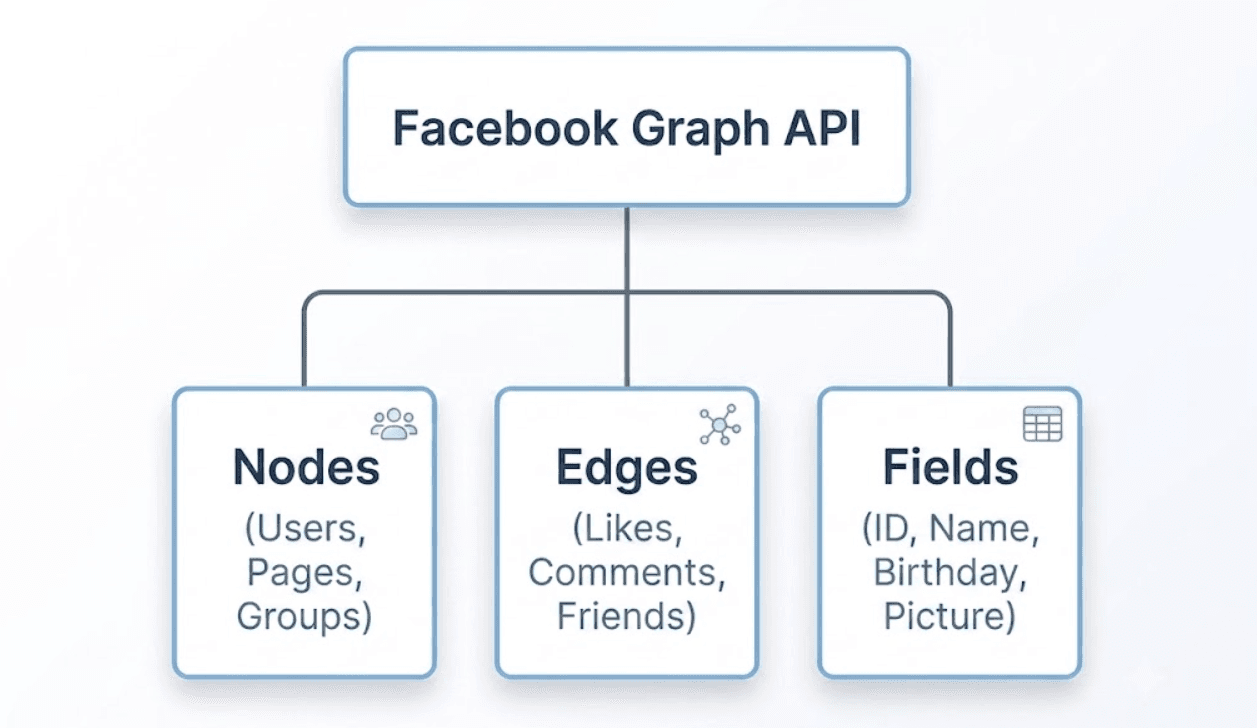
Graph API models Facebook as a graph. Three concepts carry the whole design, and once they click the endpoint naming stops feeling arbitrary.
| Concept | What it is | Example |
|---|---|---|
| Node | An individual object with an ID | A Page, a post, a photo, a comment |
| Edge | A collection attached to a node | /{page-id}/feed, /{post-id}/comments |
| Field | A property of a node | name, fan_count, created_time |
A request is almost always "one node, one edge, some fields":
GET /v26.0/{page-id}?fields=name,fan_count
GET /v26.0/{page-id}/feed?fields=message,created_time&limit=25
Two consequences matter in practice.
Fields are opt-in. If you do not ask for a field, you do not get it. There is no "return everything" mode, and this is deliberate - it keeps responses small and makes your CPU-time budget go further (more on that under rate limits).
Edges paginate by cursor, not offset. A response with more results includes a paging object with next and previous URLs. Follow those URLs rather than constructing your own offsets; cursor tokens encode state you cannot reconstruct.
{
  "data": [ /* ... */ ],
  "paging": {
    "cursors": { "before": "QVFIU...", "after": "QVFIU..." },
    "next": "https://graph.facebook.com/v26.0/{page-id}/feed?limit=25&after=QVFIU..."
  }
}
You can also expand nested edges in a single call, which is the main lever for reducing request count:
GET /v26.0/{page-id}?fields=name,posts.limit(10){message,created_time,comments.limit(5){message}}
One call instead of sixteen. Under a rate limit measured in calls per hour, that difference compounds.
What the Graph API does and does not do
Most integration plans fail on the second column of this table, not the first.
| You want to | Supported? | Notes |
|---|---|---|
| Publish text, links, photos, video to a Page | Yes | pages_manage_posts + Page access token |
| Schedule a Page post | Yes | scheduled_publish_time with published=false |
| Read Page posts and engagement | Yes | Roughly 600 ranked published posts per year are returned |
| Moderate comments on Page posts | Yes | Requires the MODERATE task on the Page |
| Publish to a personal profile | No | Removed years ago. There is no workaround |
| Publish to a Group | Effectively no | Group publishing permissions are closed to new apps |
| Read another Page you do not manage | Conditional | Requires the Page Public Content Access feature |
| Get analytics without app review | No | Advanced Access required for anything beyond your own test assets |
The single most common wasted sprint is building against personal-profile publishing. It does not exist. If your product plan says "let users post to their Facebook timeline," that plan needs to change before you write code.
The second most common is assuming Page access implies Instagram access. It does not, Instagram publishing runs through the Instagram Graph API with its own permissions, its own two-step container flow, and its own caps.
What you need before the first call
Four things, in this order. Skipping ahead wastes days.
- A Meta app in the developer dashboard, with the Facebook Login product added.
- A Facebook Page you administer. Publishing always happens as a Page, never as a person.
- A Business Portfolio if you plan to serve other companies' Pages. Solo testing works without one; multi-tenant does not.
- A privacy policy URL and a data deletion callback. These are hard requirements for app review, and they gate Advanced Access.
A note on the two access levels, because it catches everyone: Standard Access works only against assets your developer account already owns. Everything looks like it works. Then you point the same code at a customer's Page and get an empty array or a #10. That is not a bug - that is Standard Access. Serving anyone else requires Advanced Access, which requires app review.
Tokens and permissions
There are four token types. Using the wrong one is the root cause of a large share of "it works locally" bugs.
| Token | Obtained by | Lives for | Use it for |
|---|---|---|---|
| User (short-lived) | Login dialog | ~1–2 hours | Exchanging for a long-lived token |
| User (long-lived) | Exchange endpoint | ~60 days | Fetching Page tokens |
| Page | GET /me/accounts | Inherits from the user token; does not expire when derived from a long-lived user token | Publishing and reading Page content |
| System user | Business Portfolio | Does not expire | Server-to-server, multi-tenant |
The flow that actually works in production:
# 1. Exchange the short-lived user token for a long-lived one
curl -G "https://graph.facebook.com/v26.0/oauth/access_token" \
  -d "grant_type=fb_exchange_token" \
  -d "client_id=${APP_ID}" \
  -d "client_secret=${APP_SECRET}" \
  -d "fb_exchange_token=${SHORT_LIVED_USER_TOKEN}"
{
  "access_token": "EAAG...",
  "token_type": "bearer",
  "expires_in": 5183944
}
# 2. Use the long-lived user token to list Pages and their tokens
curl -G "https://graph.facebook.com/v26.0/me/accounts" \
  -d "fields=id,name,access_token,tasks" \
  -d "access_token=${LONG_LIVED_USER_TOKEN}"
{
  "data": [
    {
      "id": "1234567890",
      "name": "Acme Coffee",
      "access_token": "EAAG...",
      "tasks": ["ADVERTISE", "ANALYZE", "CREATE_CONTENT", "MESSAGING", "MODERATE", "MANAGE"]
    }
  ]
}
Check the tasks array. If CREATE_CONTENT is absent, publishing will fail with a permission error no matter how correct your request body is. The person who authorised your app simply does not have the right role on that Page - a fix that lives in Business Manager, not in your code.
Permissions you will need for a publishing integration:
pages_show_list- enumerate the user's Pagespages_read_engagement- read Page content and metricspages_manage_posts- create, edit, delete Page postspages_read_user_content- read comments and visitor postspages_manage_engagement- reply to and moderate comments
Token storage and refresh is a whole topic of its own - see our guide to Facebook Page access tokens for the permanent-token pattern, and OAuth token refresh across social APIs for handling this consistently across platforms.
Publishing a post: the full cycle
Here is the complete path, with the responses you actually get back. Photos, video, Reels and Stories each leave through a different door, and the Facebook posting API walks all four with working requests.
Text post
curl -X POST "https://graph.facebook.com/v26.0/${PAGE_ID}/feed" \
  -d "message=We just shipped webhook retries." \
  -d "access_token=${PAGE_TOKEN}"
{ "id": "1234567890_9876543210" }
That composite ID is {page-id}_{post-id}. Store the whole string - most follow-up endpoints want it in that form.
Either message or link must be supplied. A request with neither is rejected.
Link post
curl -X POST "https://graph.facebook.com/v26.0/${PAGE_ID}/feed" \
  -d "message=Our take on API rate limits." \
  -d "link=https://bundle.social/blog/social-media-api-rate-limits" \
  -d "access_token=${PAGE_TOKEN}"
A caveat worth internalising: if the URL is not publicly reachable by Facebook's scraper, the post fails. Staging URLs behind basic auth, URLs blocked by robots rules, and freshly-registered domains all trigger this. The error is 1609005, covered in the table below.
Photo post
Photos go to a different edge:
curl -X POST "https://graph.facebook.com/v26.0/${PAGE_ID}/photos" \
  -d "url=https://cdn.example.com/launch.jpg" \
  -d "caption=Launch day." \
  -d "access_token=${PAGE_TOKEN}"
{ "id": "112233445566", "post_id": "1234567890_9876543210" }
Note that you get two IDs. id is the photo object; post_id is the resulting feed story. They are not interchangeable, and using the wrong one on a follow-up call returns an unhelpful "unknown path" error.
Scheduled post
curl -X POST "https://graph.facebook.com/v26.0/${PAGE_ID}/feed" \
  -d "message=Scheduled announcement." \
  -d "published=false" \
  -d "scheduled_publish_time=1767225600" \
  -d "access_token=${PAGE_TOKEN}"
scheduled_publish_time is a Unix timestamp. Both fields are required together - sending scheduled_publish_time while published defaults to true publishes immediately and silently ignores your schedule. That silent failure is worth a test in your suite.
Verifying it landed
Do not trust the 200. Read the post back:
curl -G "https://graph.facebook.com/v26.0/${POST_ID}" \
  -d "fields=id,message,created_time,is_published,permalink_url" \
  -d "access_token=${PAGE_TOKEN}"
is_published is the field that tells you whether a scheduled post has actually gone out. In a queue-driven system, this read-back is what turns "we called the API" into "the customer's post exists."
Rate limits: two systems, not one
Graph API applies two different rate-limiting models, and which one you get depends on the token you used. This trips up teams who benchmark with one token type and ship with another.
Platform rate limits (app and user tokens)
Calls within one hour = 200 × Number of Users
"Number of Users" is your app's unique daily active users, not installs. An app with 100 active users gets 20,000 calls per hour - pooled, not per user. One heavy user can consume most of the budget.
Business Use Case limits (Page and system user tokens)
Calls within 24 hours = 4800 × Number of Engaged Users
"Engaged Users" means people who interacted with the Page in the last 24 hours. This is the model that matters for publishing integrations, and it has an uncomfortable property: a quiet Page has a small budget. A brand-new client Page with almost no engagement gives you very little headroom, exactly when your onboarding flow wants to backfill content.
Read the headers
Every sufficiently-used endpoint returns X-App-Usage:
x-app-usage: {"call_count":28,"total_time":25,"total_cputime":25}
All three are percentages of your allowance, 0–100, not raw counts:
| Field | Meaning | Throttles at |
|---|---|---|
call_count | Share of call allowance used | 100 |
total_time | Share of wall-clock processing allowance | 100 |
total_cputime | Share of CPU-time allowance | 100 |
The two time fields are the ones people miss. You can be at call_count: 12 and still get throttled because total_cputime hit 100 - which is what happens when you request wide field sets across large edges. Trimming fields is not a micro-optimisation here; it is the fix.
Log all three on every response and alert at 80. By the time you are throttled, you have already failed customer posts. For the cross-platform picture, see social media API rate limits.
Batching: saves round trips, not quota
Batch requests let you send up to 50 operations in one HTTP call:
curl -X POST "https://graph.facebook.com/v26.0/me" \
  -d 'batch=[
    {"method":"GET","relative_url":"PAGE-A-ID?fields=name,fan_count"},
    {"method":"GET","relative_url":"PAGE-B-ID?fields=name,fan_count"}
  ]' \
  -d "include_headers=false" \
  -d "access_token=${TOKEN}"
The response is an array of logical HTTP responses. Note that body arrives as a JSON-encoded string, not a nested object - you have to parse each one:
[
  { "code": 200, "body": "{\"name\":\"Page A Name\",\"id\":\"PAGE-A-ID\"}" },
  { "code": 200, "body": "{\"name\":\"Page B Name\",\"id\":\"PAGE-B-ID\"}" }
]
You can mix methods in a single batch - publish and then read back in one round trip:
[
  { "method": "POST", "relative_url": "PAGE-ID/feed", "body": "message=Test status update" },
  { "method": "GET",  "relative_url": "PAGE-ID/feed" }
]
Here is the part that surprises people. Batching does not reduce your rate-limit consumption. Meta's own guidance is explicit: each call within a batch is counted separately for call limits, and each contributes to CPU resource limits exactly as it would on its own. A batch of ten calls counts as ten calls.
So batching is a latency and connection-count optimisation, not a quota optimisation. If you are hitting call_count: 100, batching will not save you. Field expansion will, because one expanded call really is one call. Getting this backwards leads teams to build batching infrastructure that solves a problem they did not have.
Also set include_headers=false unless you need them - response headers are frequently larger than the payloads themselves.
Webhooks instead of polling
Polling for changes is the fastest way to burn a rate limit on nothing. Webhooks push notifications to you when a subscribed field changes.
You choose an object type (page, user, instagram), subscribe to specific fields, and receive a POST when a value changes:
{
  "object": "page",
  "entry": [
    {
      "id": "1234567890",
      "time": 1520383571,
      "changes": [
        { "field": "feed", "value": { "verb": "add", "post_id": "1234567890_9876543210" } }
      ]
    }
  ]
}
Two things worth knowing before you plan around them:
Webhooks do not require app review. This is unusual and useful - you can build and test real-time behaviour before you have Advanced Access.
But webhooks still respect permissions. Subscribing to a field you do not have permission to read produces silence, not an error. If your webhook endpoint is quiet in Live mode, the cause is almost always a missing permission rather than a misconfigured subscription.
Your endpoint must be HTTPS with a valid certificate. Self-signed certificates are rejected outright, which makes local development awkward - use a tunnel rather than fighting it.
bundle.social
Nodes, edges, batching and the full error table, already wrapped.
Three upload hosts and two auth header words, handled behind one endpoint.
App review: what actually gets rejected
Every permission beyond your own assets needs Advanced Access, and Advanced Access needs review. Budget one to three weeks, plus at least one rejection.
What you submit:
- A screencast showing the full user journey, including the Facebook Login dialog and the exact permission being used
- A written explanation per permission of why your product needs it
- Working test credentials
- A reachable privacy policy and a data deletion callback
The rejections that repeat:
The screencast does not show the permission in use. Reviewers need to see the login dialog, the consent screen, and the resulting feature. A product tour is not enough.
Requesting more than you use. Asking for pages_manage_engagement when your product only publishes reads as overreach and gets the whole submission bounced. Request the minimum, ship, then request more later.
Test credentials that do not work. The reviewer has a limited window. An expired trial account or an account without a connected Page ends the review immediately.
No visible data deletion path. The callback must exist and respond, and your privacy policy must describe deletion in plain language.
We cover the per-permission requirements in Facebook API permissions and app review.
Error codes you will actually hit
This is the table nobody publishes, and the one you will keep open during your first month in production. Codes and recovery tactics below follow Meta's own error reference.
Every error comes back in this shape:
{
  "error": {
    "message": "Message describing the error",
    "type": "OAuthException",
    "code": 190,
    "error_subcode": 460,
    "error_user_title": "A title",
    "error_user_msg": "A message",
    "fbtrace_id": "EJplcsCHuLu"
  }
}
Always log fbtrace_id. It is the only identifier Meta support can act on, and it expires quickly.
| Code | Name | What it means for you | Recovery |
|---|---|---|---|
1 | API Unknown | Usually transient downtime | Retry with backoff; if persistent, verify the endpoint exists |
2 | API Service | Temporary outage on Meta's side | Retry with backoff |
3 | API Method | Your app lacks the capability or permission for this call | Fix permissions; do not retry |
4 | API Too Many Calls | App-level throttling | Back off, inspect X-App-Usage |
10 | API Permission Denied | Permission not granted or since removed | Re-request consent; do not retry |
17 | API User Too Many Calls | User-level throttling | Back off; spread load across users |
190 | Access token expired | Token invalid, expired, or revoked | Refresh or re-authenticate; check subcode |
200–299 | API Permission | A specific permission is missing | Map the code to the permission and re-request |
341 | Application limit reached | App-level cap hit | Back off; review request volume |
368 | Temporarily blocked for policy violations | Behavioural block, often from spammy patterns | Stop, wait, review content patterns |
506 | Duplicate Post | Identical content published consecutively | Change the content; do not retry the same body |
1609005 | Error Posting Link | The scraper could not read the URL | Verify the URL is public and resolvable |
Subcodes on 190 tell you what specifically broke:
| Subcode | Meaning | Recovery |
|---|---|---|
458 | App not installed | User has not authorised your app; reauthenticate |
459 | User checkpointed | User must log in to Facebook to clear a security check |
460 | Password changed | Re-authenticate |
463 | Expired | Token expired; refresh |
464 | Unconfirmed user | User must resolve an account issue with Facebook |
467 | Invalid access token | Token revoked or malformed |
492 | Invalid session | The user no longer has the right role on the Page |
492 deserves emphasis. It is not a token problem - your token is fine. Someone removed that person's admin role on the Page in Business Manager. No amount of refreshing fixes it, and the only useful response is to tell the customer which Page lost access and who needs to restore it. Treating 492 as a generic auth failure and retrying forever is a common and expensive bug.
Two retry classes. Codes 1, 2, 4, 17, 341, 368 are transient - retry with exponential backoff. Codes 3, 10, 200–299, 506, 1609005 and every 190 subcode are terminal - retrying is guaranteed to fail and, in the case of 368, deepens the block.
Some numbers from our own traffic, across the Facebook publishing we run for customers: expired-token failures (190 with subcode 463) account for about 2% of all failed Page publishes, and 492 - the lost-role case - for roughly another 2%. Everything else in the 190 family plus the terminal codes above adds up to about 10%. The remaining majority are transient network and rate-limit conditions that succeed on retry.
The ratio is the useful part. Roughly one in seven Facebook publish failures is permanent and needs a human to reconnect an account or restore a role, and no retry policy will ever clear them. If your dashboard treats every failure as "will probably resolve itself," that seventh is invisible until the customer complains.
Versioning: the clock you forgot to set
Graph API versions are dated. v26.0 is current, released 29 July 2026. Each version is supported for roughly two years from release, after which calls are silently upgraded to the oldest available version - which may behave differently from what you built against. v25.0 remains available until July 2028, v23.0 until October 2027.
That support window is longer than most teams assume, and it is why running a version or two behind is a legitimate choice rather than technical debt - we publish through v23.0 in production today. What is not legitimate is not knowing which version you are on.
A concrete example of why: the metadata parameter was deprecated in v25.0, and on 19 May 2026 that deprecation extended to all versions. Code that introspected nodes with metadata stopped working on that date regardless of the version it pinned. Pinning protects you from version-scoped changes; it does not protect you from all-version deprecations, which arrive on their own schedule and are announced only in the changelog.
Practical rules:
- Pin the version in every URL.
graph.facebook.com/v26.0/..., never an unversioned path. Unversioned calls silently follow the default, which changes underneath you. - Put a calendar reminder at 18 months. Version migration is a scheduled maintenance task, not an emergency.
- Read the changelog for every version bump, not just the one you are moving to. Breaking changes accumulate.
The shorter path
Everything above is one platform. A product that publishes to Facebook usually needs Instagram, LinkedIn, TikTok, and X too - each with its own token model, its own rate-limit maths, and its own error taxonomy.
With bundle.social's Facebook API integration the same post is one call:
curl -X POST "https://api.bundle.social/api/v1/post" \
  -H "x-api-key: ${BUNDLE_API_KEY}" \
  -H "content-type: application/json" \
  -d '{
    "teamId": "team_123",
    "postDate": "2026-08-14T09:00:00Z",
    "title": "Webhook retries announcement",
    "status": "SCHEDULED",
    "socialAccountTypes": ["FACEBOOK"],
    "data": { "FACEBOOK": { "text": "We just shipped webhook retries." } }
  }'
Tokens, refresh, version pinning, and retry classification are handled on our side. What you keep is the part that matters to your users; what you drop is the maintenance.
| Native Graph API | bundle.social | |
|---|---|---|
| Token lifecycle | You build and monitor it | Managed |
| Version migrations | Your calendar | Managed |
| Error classification | You map every code | Normalised across platforms |
| Adding Instagram | A second integration | One field in the same call |
| App review | Yours to pass | Ours, already passed |
FAQ
Is the Facebook Graph API free? Yes. There is no charge for Graph API calls. The costs are rate limits, app review, and engineering time.
Can I post to a personal Facebook profile via the API? No. Publishing to personal timelines was removed and there is no supported workaround. The Graph API publishes as a Page.
Why do my API calls work for my own Page but not for customers' Pages? You are on Standard Access, which only reaches assets your developer account owns. Serving other people's Pages requires Advanced Access, which requires app review.
How long does a Page access token last?
A Page token derived from a long-lived user token does not carry its own expiry, but it dies when the underlying user token or the user's Page role does. Treat it as revocable at any time and handle 190 and 492 explicitly.
What is the difference between the Graph API and the Marketing API? Graph API covers organic content, Pages, and engagement. Marketing API covers ad accounts, campaigns, and delivery. They share infrastructure and versioning but have separate permissions and separate review paths.
What happens when Facebook deprecates the version I am using? Calls are silently upgraded to the oldest supported version. Behaviour can change without an error. Pin your version and plan a migration every 18 months.
