Social Media Analytics API: Normalized Metrics, Coverage and Freshness
We publish to fifteen platforms and read analytics from twelve. This guide is the difference: the field-by-field mapping, the metrics that have no counterpart and arrive as zero, a 24-hour refresh interval with five forced exceptions a day, and why analytics spends the same quota as publishing.
A social media analytics API pulls performance metrics from social platforms programmatically and returns them in one shape. The easy part is access: every platform has an insights endpoint. The hard part, and the only one worth writing a guide about, is that "impressions" does not mean the same thing on two of them, several platforms do not report it at all, and the number you read is always older than you think.
This guide is our analytics layer with the lid off: what we normalize to, which fields have no counterpart on which platform, how stale a value can be before we refresh it, and what analytics costs against the same rate-limit budget you use for publishing. Verified against our own source and the platform documentation on 25 August 2026.
What changed in the August 2026 update
- The YouTube quota figure was wrong.
videos.insertno longer costs 1,600 units from the shared daily pool. It costs 1 unit from a separate Video Uploads bucket capped at 100 uploads per day, andsearch.listmoved to the same model. Corrected in the rate-limit section below. - Coverage is stated honestly for the first time. We publish to fifteen platforms and read analytics from twelve. Post-level analytics work on eleven of those. The previous revision said "11 platforms" without saying which layer, and a call-to-action on this page claimed fifteen.
- Storage is described as it actually works. Raw platform payloads are not a field inside the normalized row. They live in separate, compressed tables on a time-series database, with retention and downsampling running natively there.
- Three non-rendering documentation cards were removed. They were
<Card>components from our docs site pasted into a blog post, and they had been rendering as literal markup.
TL;DR
- Twelve platforms for account analytics, eleven for post analytics. No analytics for X, Discord or Slack. Google Business Profile is account-level only.
- Nine normalized fields per post, nine per account. Anything a platform does not report is stored as zero, which is why the "not available" column below matters more than the mapping itself.
- Refresh interval is 24 hours for both accounts and posts, with post analytics only refreshed inside a 7-day window after publishing, and 5 forced refreshes per team per day when you need a number now.
- The raw payload is kept alongside every normalized row, compressed, so a disagreement with the native dashboard is answerable instead of arguable.
- Analytics spends the same platform quota as publishing. On Meta it is literally the same counter.
The problem is not access, it is comparability
Every platform ships an insights endpoint. Pointing at five of them is a week of work. Making the five results comparable is the project.
Take a single question: how many people saw this post? Instagram answers with reach and impressions, which are different numbers. YouTube answers with views, which counts something else again. Reddit answers with upvotes and comment counts and does not answer the question at all. LinkedIn distinguishes impressions from unique impressions. TikTok reports video views. None of these are wrong; they are answers to different questions that share a word.
There are three honest ways to handle that, and only one of them survives contact with a customer:
| Approach | What you get | Why it fails |
|---|---|---|
| Pass the platform payloads through untouched | Perfect fidelity | Every consumer reimplements the normalization, differently, and your dashboard cannot sum anything |
| Normalize to a rich common model | Comparable numbers everywhere | The model has to invent values for metrics that do not exist, and invented numbers end up in someone's board deck |
| Normalize to a deliberately small model, keep the raw payload | Comparable numbers where comparison is real, evidence where it is not | Nothing, except that you have to be honest about the gaps |
We do the third. The normalized model is intentionally boring, and the interesting information is which cells are empty.
What we normalize to
Two shapes, and they are short on purpose.
// account level (social_account_analytics)
{
  impressions: number,
  impressionsUnique: number,
  views: number,
  viewsUnique: number,
  likes: number,
  comments: number,
  postCount: number | null,
  followers: number | null,
  following: number | null,
}

// post level (profile_post_analytics)
{
  impressions: number,
  impressionsUnique: number,
  views: number,
  viewsUnique: number,
  likes: number,
  dislikes: number,
  comments: number,
  shares: number,
  saves: number,
}
Both are stored as time series rather than as a current-value row: every refresh writes a new row keyed by (id, createdAt), so a follower count is a curve and not a number that was overwritten last night. This is the part people skip when they build it themselves, and it is the part you cannot backfill later. Platforms will not tell you what your reach was in March if you did not ask in March.
impressions and views are kept separate rather than merged, and so are their unique variants, because collapsing them is exactly the lossy decision that makes a normalized model untrustworthy. If a platform reports only one of the four, the other three are zero, and zero here means "not reported", not "nobody saw it". That ambiguity is real and it is the reason for the coverage table below.
The mapping, field by field
This is the table most analytics vendors will not publish, and it is the only one worth reading before you build a chart. Three states per cell:
- • the platform reports this metric and we store what it returned
- ≈ derived: we computed it from other values the platform returned, and the note below says from what
- – not collected: the column is a zero, and a zero here is not a measurement
Account level
| Platform | impressions | impressionsUnique | views | viewsUnique | likes | comments | postCount | followers | following |
|---|---|---|---|---|---|---|---|---|---|
| TikTok | ≈ | ≈ | • | • | • | • | • | • | • |
| YouTube | ≈ | ≈ | • | ≈ | – | • | • | • | – |
| • | • | • | – | • | • | • | • | • | |
| • | • | • | – | – | – | – | • | – | |
| Threads | – | – | • | – | • | • | • | • | – |
| – | – | – | – | – | – | – | – | – | |
| ≈ | ≈ | ≈ | ≈ | ≈ | – | ≈ | • | • | |
| Mastodon | – | – | – | – | – | – | • | • | • |
| LinkedIn (person) | • | • | – | – | • | • | – | • | – |
| LinkedIn (company) | • | • | • | • | • | • | • | • | – |
| Bluesky | – | – | – | – | – | – | • | • | • |
| Google Business | • | – | – | – | – | – | – | – | – |
| Snapchat | ≈ | ≈ | • | • | • | • | • | • | – |
Post level
| Platform | impressions | impressionsUnique | views | viewsUnique | likes | dislikes | comments | shares | saves |
|---|---|---|---|---|---|---|---|---|---|
| TikTok | ≈ | ≈ | • | ≈ | • | – | • | • | • |
| YouTube | ≈ | ≈ | • | ≈ | • | – | • | – | • |
| • | • | • | – | • | – | • | • | • | |
| • | • | • | • | • | – | • | • | – | |
| Threads | • | ≈ | • | ≈ | • | – | • | • | – |
| – | – | • | – | • | • | • | ≈ | – | |
| • | ≈ | ≈ | ≈ | • | – | • | – | • | |
| Mastodon | – | – | – | – | • | – | • | • | – |
| LinkedIn (person) | • | • | • | ≈ | • | – | • | • | – |
| LinkedIn (company) | • | • | – | – | • | – | • | • | – |
| Bluesky | ≈ | – | ≈ | – | • | – | • | ≈ | – |
| Snapchat | ≈ | ≈ | • | • | • | – | • | • | • |
| Google Business | n/a | n/a | n/a | n/a | n/a | n/a | n/a | n/a | n/a |
What the non-obvious cells actually contain
TikTok. The account row mixes time bases on purpose, and you should know which: likes is a lifetime total from the account profile, while impressions, views and comments are summed over a rolling 30-day window. Account impressions is video views, not an impressions metric, because the Business API does not expose one.
YouTube. The account row is channel-lifetime statistics, not a windowed report, so impressions, impressionsUnique, views and viewsUnique are all the same viewCount number. Post dislikes maps to statistics.dislikeCount, which YouTube stopped returning publicly in 2021, so it is zero in practice. Detailed, windowed reports come from the separate YouTube Analytics API, not from the Data API.
Instagram. impressions maps to Meta's unified views metric, which replaced the old impressions metric. Account views is profile_views, meaning profile visits rather than content views. Stories are rejected for post analytics with an explicit error rather than returned as zeros, because Story insights expire and a stale zero is worse than a clear refusal. The metric set requested differs by media type, and Meta rejects unsupported metrics per type rather than ignoring them.
Facebook. Several Meta metrics were deprecated and are read from their replacements: page_impressions is now page_media_view, page_fans is now page_follows, and post_impressions is now post_media_view. Post comments and shares do not come from Insights at all but from a second call on the post node. Reels and videos read a different metric family than feed posts, and both families are requested together because Meta silently omits video metrics on a Reel node and Reel metrics on a video node.
Threads. The API publishes no impressions or unique-viewer metric at all, so those columns are zero at the account level rather than borrowed from views. views has no total value in the response and is summed from its daily series. postCount is a page count rather than a true total. Insights cannot be queried for dates before 13 April 2024.
Reddit. There is no account analytics surface: the entire account row is zeros, with karma preserved only in the raw payload. Post likes and dislikes are ups and downs, shares is the crosspost count, and views is populated only because Reddit returns view_count to the author of the post.
Pinterest. Account figures are aggregated by us from per-pin analytics, because Pinterest does not return account totals in the shape we need. Account likes is the save count. views falls back to impressions for non-video pins, since the underlying metric is a video start. Follower and following counts are page lengths rather than count fields, so treat them as approximate on large accounts.
Mastodon. No impressions or views exist anywhere in the API. What you get is favourites, replies and reblogs, mapped to likes, comments and shares, plus profile counts.
LinkedIn. Personal profiles and company pages use two different APIs and produce genuinely different rows: company pages have page views, personal profiles do not. Personal post views is a video-play count and is fetched only for video posts, so it is zero for every text and image post. Engagement rate is computed by us rather than returned, and lives in the raw payload rather than in a normalized column. Company post analytics are unavailable for posts older than 30 days.
Bluesky. The AT Protocol has no analytics API. Likes, replies, reposts and quotes are counters on the post record itself, and the impressions and views columns are derived from the sum of those four. That is an engagement proxy and explicitly not an impression count. Treat it as a relative signal within Bluesky and never compare it to an impressions number from another platform.
Google Business Profile. Account level only, because the per-post insights endpoint was sunset in 2023. The single populated column is impressions, summed across the four desktop and mobile, maps and search series. Everything else the API returns (clicks, calls, direction requests, conversations, bookings, food orders) is in the raw payload rather than in a normalized column, because none of it has a counterpart on any other platform.
Snapchat. Metric names vary by surface and by account, so each cell resolves through a fallback chain and takes the first name that returns a value. Post saves is a screenshot count, which is the closest thing Snapchat has to a save. Account impressions is the same value as views.
How to read a zero
The normalized columns are non-nullable integers. A platform that does not report a metric contributes nothing, and nothing is stored as 0. There is no null to distinguish "nobody saw this" from "this platform does not count that".
That is a deliberate trade: nullable columns across nine fields and twelve platforms would push the ambiguity into every consumer instead of resolving it here. The resolution is this table. Use it as a lookup before you chart a field, and where you need certainty for one specific post, the raw payload will tell you whether the platform returned the metric at all.
Coverage: publishing is wider than analytics
The most common vendor sleight of hand in this category is quoting the publishing platform count on the analytics page. Ours differ, so here is the split:
| Layer | Count | Platforms |
|---|---|---|
| Publishing | 15 | TikTok, YouTube, Instagram, Facebook, X, Threads, LinkedIn, Pinterest, Reddit, Mastodon, Discord, Slack, Bluesky, Google Business Profile, Snapchat |
| Account analytics | 12 | TikTok, YouTube, Instagram, Facebook, Threads, Reddit, Pinterest, Mastodon, LinkedIn, Bluesky, Google Business Profile, Snapchat |
| Post analytics | 11 | The twelve above, minus Google Business Profile |
Three platforms we publish to have no analytics at all: X, Discord and Slack. Google Business Profile reports at the account level only, because the per-post insights endpoint (localPosts.reportInsights) was sunset in 2023 and nothing replaced it.
If you are evaluating any vendor in this category, this is the table to ask for. "We support 15 platforms" on an analytics page is not an answer to "can I chart my X engagement", and the difference between twelve and fifteen is the difference between a working dashboard and three empty tiles.
Freshness: how old is the number you just read
Analytics APIs are usually vague here, which is convenient, because "real-time analytics" is a phrase no platform's data actually supports. Ours in numbers:
| Setting | Value | What it means |
|---|---|---|
| Account refresh interval | 24 hours | An account is eligible for refresh 24 h after its last successful pull |
| Post refresh interval | 24 hours | Same rule, per post |
| Post refresh window | 7 days | Post metrics are refreshed only inside a week of publishing, after which the last value stands |
| Scanner tick, accounts | 5 minutes | How often we look for accounts that became due |
| Scanner tick, posts | 1 minute | Same, for posts |
| Forced refresh | 5 per team per day | The escape hatch for "I need this number now" |
| Refresh attempts | 3, 3 minutes apart | A platform hiccup does not cost you a day of data |
So the honest answer to "how fresh is this" is: up to 24 hours old, plus up to a few minutes of queue, and you can force five exceptions per team per day. Both intervals are overridable per organization, and analytics can be switched off per organization or per individual social account, which matters when one connected account is burning quota on a platform you do not report on.
The seven-day window on post metrics deserves the reasoning, because it looks like a limitation and is mostly arithmetic. Engagement on a social post is front-loaded to the point of caricature; refreshing a nine-month-old post daily buys a number that has not moved since the first week, and it does it by spending quota that a post published this morning needs. The cutoff is where that trade stops paying.
The pipeline behind those numbers is a scanner and a refresher rather than one loop: the scanner claims what is due and the refresher makes the platform calls, running up to 50 post refreshes concurrently against a scan rate of roughly 2,200 due posts per minute. Splitting them is what stops one slow platform from blocking every other account's refresh.
bundle.social
Twelve platforms normalized to one schema, with the raw payload kept next to every row.
Normalized metrics across every platform, with the raw payload kept alongside.
The raw payload, and why it is stored separately
Every normalized row has a matching raw row: the platform's response, unmodified, gzip-compressed, in its own table. Not a raw field inside the metrics row, which is how the previous version of this article described it and how most people assume it works.
The separation earns its keep three times:
When a customer disputes a number. "Your reach is different from the Instagram app" is answerable in one query, with the exact payload the platform returned at the time we read it. Without the raw copy, all you can say is that your number is your number.
When a platform adds a metric. It lands in the raw payload immediately and can be backfilled into the normalized model later. Discard the raw and the history starts on the day you shipped the mapping.
When storage is the constraint. Raw insight payloads are large, repetitive JSON, and demographic breakdowns are the worst of it. Compressing per row and keeping them out of the hot metrics table is what makes retaining them affordable at all. Retention and downsampling then run natively on the time-series database rather than as application jobs.
Two of the heaviest raw collections are opt-in per organization rather than on by default:
rawTiktokAnalyticsEnabledstores the complete TikTok response, including audience ages, cities and engaged-audience breakdowns.rawInstagramDemographicsEnabledstores follower demographics by country, city, age and gender, the engaged-audience equivalent, and the daily follows and unfollows series.
They are off by default because demographic data is the part of an analytics pipeline with real privacy weight, and because the volume is significant. Ask for them when you need them rather than collecting them because the endpoint exists.
Analytics spends the same quota as publishing
This is the constraint that decides your architecture, and it is missing from most articles on the subject: on several platforms, reading metrics and publishing posts draw on the same rate-limit budget.
Meta is the clearest case. Facebook and Instagram allowances are derived from engagement (roughly 4,800 multiplied by engaged users or impressions per 24 hours) and every Insights call comes out of the same allowance as every publish. A brand-new account has almost no budget, which is exactly when a customer wants a backfilled dashboard. Worse, the X-App-Usage header reports call_count, total_time and total_cputime as percentages, and wide Insights queries over large edges drive total_cputime up far faster than the call count suggests. You can be throttled at 12% of your call budget.
YouTube works on a different model, and this is where the widely repeated number is wrong. A project gets 10,000 units per day for most methods, search.list costs 100 units per call, and most list calls cost 1. The two expensive operations were moved into their own daily buckets: videos.insert now costs 1 unit and is capped at 100 uploads per day, per the quota calculator and the videos.insert reference, both checked on 25 August 2026. The old figure of 1,600 units produced the "about six uploads a day" line that is still repeated across the internet, including in an earlier version of this page. For analytics specifically the practical constraint is different anyway: detailed reports come from the separate YouTube Analytics API, and paginating a report costs the full quota for every page.
The rest vary: Pinterest categorises limits per endpoint without publishing numbers, LinkedIn does not publish standard limits at all and tells you to read your app's analytics tab, Mastodon counts requests per account and per IP separately. The full breakdown of the four counting models, with headers and backoff rules, is in social media API rate limits.
The design consequence is simple and unpopular: you cannot poll. A dashboard that refreshes on page load will exhaust a customer's Meta allowance and then break their publishing, which is a far worse outcome than a stale chart. Read from your own store, refresh on a schedule, and treat forced refresh as a rationed exception. That is why ours is rationed at five per team per day rather than left open.
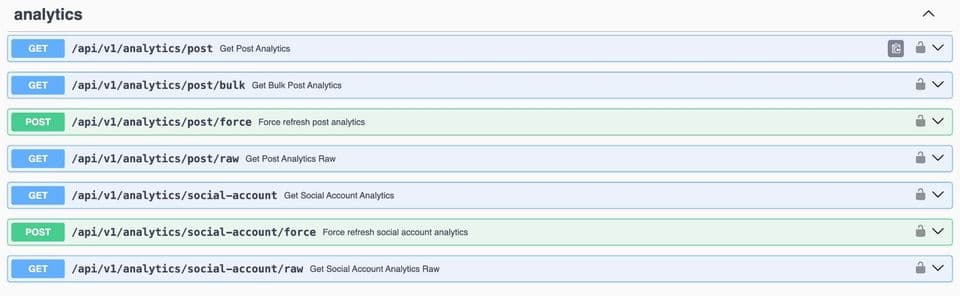
Pulling the data
Seven endpoints, and the split between them is the whole API.
# normalized, current values
GET /api/v1/analytics/social-account?socialAccountId=...
GET /api/v1/analytics/post?postId=...

# the platform's own payload, for the same subject
GET /api/v1/analytics/social-account/raw?socialAccountId=...
GET /api/v1/analytics/post/raw?postId=...

# many posts at once, paginated: the one to build reports on
GET /api/v1/analytics/post/bulk?postIds=id1,id2,id3&limit=60

# rationed escape hatch, 5 per team per day
POST /api/v1/analytics/social-account/force
POST /api/v1/analytics/post/force
A cross-platform comparison is then a loop over accounts with no per-platform branching, which is the entire point of normalizing in the first place:
import os, requests

BASE = "https://api.bundle.social/api/v1"
HEADERS = {"x-api-key": os.environ["BUNDLE_API_KEY"]}

def account_metrics(social_account_id: str) -> dict:
    r = requests.get(
        f"{BASE}/analytics/social-account",
        headers=HEADERS,
        params={"socialAccountId": social_account_id},
        timeout=15,
    )
    r.raise_for_status()
    return r.json()

def compare(accounts: dict[str, str]) -> None:
    for platform, account_id in accounts.items():
        m = account_metrics(account_id)
        # zero can mean "not reported by this platform", so say so rather than charting a 0
        reach = m["impressionsUnique"] or m["impressions"] or None
        print(
            f"{platform:<10} followers={m['followers'] or 'n/a':>9}  "
            f"reach={reach or 'not reported':>12}  "
            f"engagement={m['likes'] + m['comments']:>9}  "
            f"as of {m['updatedAt']}"
        )
Two habits worth building in from the start. Print or store updatedAt next to every number you show a human, because a chart without a timestamp invites a conversation about whether the data is broken. And distinguish a real zero from an unreported metric in your own code, because the API cannot do it for you: the storage type is an integer, and "not reported" arrives as 0.
Build it yourself, or not
The build-versus-buy line for analytics sits in a different place than it does for publishing, and it is worth being precise rather than persuasive.
Build if you need one or two platforms, you own the accounts, and you want the raw platform semantics rather than a normalized model. Analytics has a real advantage over publishing here: reads are idempotent. There is no duplicate-post failure mode, no app-review gate for most read scopes, and a failed read can simply be retried. A single-platform analytics integration is genuinely a reasonable weekend.
The cost is not the first integration, it is the four things after it. Normalization decisions that you will have to keep defending. A time-series store, because the platforms will not keep your history. Quota accounting shared with whatever else you do on that platform. And the maintenance: metric names and availability change, endpoints get sunset (Google Business Profile's per-post insights are the example above), and every change arrives as a silently different number rather than an error.
Buy once you are past four platforms, or once you are reading on behalf of other people's accounts. Multi-tenant analytics means per-customer tokens, per-customer quota, and a reconnect story when a token dies, and that is where the weekend project stops being one.
Frequently asked questions
What is a social media analytics API?
An interface that returns performance metrics from social platforms programmatically, either per account (followers, impressions, profile activity) or per post (impressions, likes, comments, shares, saves). A unified one puts a single schema in front of many platforms, which turns a comparison across networks into a query rather than a project.
Which platforms have analytics here?
Twelve at the account level: TikTok, YouTube, Instagram, Facebook, Threads, Reddit, Pinterest, Mastodon, LinkedIn, Bluesky, Google Business Profile and Snapchat. Eleven of those also report per post; Google Business Profile is account-level only. X, Discord and Slack have no analytics even though we publish to them.
How fresh is the data?
Up to 24 hours old. Accounts and posts are refreshed on a 24-hour interval, posts only within seven days of publishing, and you get five forced refreshes per team per day when you need a value immediately. Both intervals are configurable per organization.
Why is a metric zero instead of missing?
Because the normalized columns are non-nullable integers, and a platform that does not report a metric contributes nothing to it. Treat zero as "not reported by this platform" unless you know the platform reports that field, and use the coverage table to tell the two apart. The raw payload will confirm which of the two it was.
Can I get the original platform response?
Yes, from the /raw endpoints, for both accounts and posts. It is the unmodified payload as the platform returned it, stored alongside the normalized row. Two heavier collections, full TikTok analytics and Instagram follower demographics, are enabled per organization on request rather than by default.
Does pulling analytics affect my publishing limits?
On Meta, directly: Insights calls and publishes draw on the same engagement-derived allowance, and wide queries burn CPU-time budget faster than call-count budget. Elsewhere the counters are usually separate but still finite. Either way, do not poll: read from a store, refresh on a schedule, and ration forced refreshes.
How far back does the history go?
As far back as you have been connected. We store every refresh as a new time-series row rather than overwriting the previous value, so history accumulates from the day an account is connected. What no API can do is recover metrics from before that, because most platforms retain detailed analytics for 30 to 90 days and will not serve what they have already dropped.
What about demographics and audience data?
Available as raw platform data rather than as normalized fields, because the shapes are too platform-specific to normalize honestly: Instagram breaks followers down by country, city, age and gender and separates them from the engaged audience, while TikTok reports audience ages and cities on a different basis. Both are opt-in per organization.