X (Twitter) API Pricing in 2026: What It Actually Costs
X replaced subscription tiers with pay-per-use, and there is no Enterprise tier in the pricing table any more. Covers the full rate card, the 2 million read cap, the 24-hour deduplication window most guides miss, and why a post containing a link costs 13.3 times a post without one.
X API pricing used to be easy to summarize and painful to pay: choose a fixed monthly tier, accept its limits, and hope your use case fit neatly inside the box.
That is no longer the current model.
X replaced subscription tiers with pay-per-use in February 2026. There is no free tier and no monthly plan - you buy credits upfront and are billed per operation. Reading a post costs $0.005, creating one costs $0.015, and creating one that contains a URL costs $0.200. Pay-per-use is capped at 3 million post reads per billing cycle. Those four numbers decide whether your product is viable on X, so this guide models them properly rather than listing them.
That sounds simpler. For small workloads, it often is. But the final cost still depends heavily on what your product actually does. An app that publishes a few text posts is cheap. A platform that reads timelines, synchronizes users, publishes link-heavy content, tracks engagement, manages media, and supports thousands of connected accounts can become expensive surprisingly quickly.
TL;DR: X currently charges per resource read or action performed. A standard post creation request costs $0.015, while a post containing a URL costs $0.200. Reading a post costs $0.005 per resource. The API bill may be low for a small publishing tool, but production costs also include OAuth, media handling, scheduling, retries, rate limits, account mapping, monitoring, and support.
The full rate card
Verified against X's own pricing documentation on 17 August 2026.
Reads, per resource
| Resource | Price |
|---|---|
| Posts | $0.005 |
| Users, DM events, following/followers | $0.010 |
| Lists, Spaces, Communities, Notes, profile updates | $0.005 |
| Likes, mutes, blocks | $0.001 |
| Owned reads - your own app reading its own data | $0.001 |
Writes, per request
| Operation | Price |
|---|---|
| Create a post | $0.015 |
| Create a post containing a URL | $0.200 |
| Summoned post (a reply to a mention of your app) | $0.010 |
| DM and user interactions | $0.015 |
| Delete an interaction | $0.010 |
| Lists, bookmarks, content management | $0.005-$0.010 |
Webhooks, per event delivered
| Event | Price |
|---|---|
post.create | $0.005 |
| Follow events | $0.010 |
| Mutes, blocks | $0.001 |
Cap: 3 million post reads per monthly billing cycle on pay-per-use. Above that, X's docs point you at a negotiated Enterprise arrangement - there is no higher self-serve tier to buy.
X uses prepaid credits. You purchase credits in the Developer Console, set spending limits, and monitor usage there.
These rates can change, so any production budget should use the official X pricing page as the final source of truth. The important part is not memorizing every cent. It is understanding which operations your application performs and how often.
What changed, and when
| Date | Change |
|---|---|
| February 2026 | Subscription tiers replaced by pay-per-use. Free tier removed |
| 20 April 2026 | Owned reads repriced to $0.001; further rate adjustments |
| Ongoing | Legacy Basic ($200/mo) and Pro ($5,000/mo) remain for existing subscribers only, closed to new signups |
There is no Enterprise tier in the pricing table. This trips people up, because half the guides on the subject still present X as a four-tier ladder. As of August 2026, pay-per-use is the entire published offering for standard API access - no Free, no Basic, no Pro, no Enterprise line item, no subscription, no minimum commitment.
Enterprise still exists, but only as an escape hatch: X's own documentation mentions it in exactly one context, as what you move to if you need more than 3 million post reads a month. It has no published price, no published feature list, and no self-serve path. Figures circulate - you will see "$42,000+" and "from $50,000" per month quoted around the web - but none trace back to X, and we have not been quoted one either. Treat any number you read as a rumour about a sales conversation, and treat that conversation as something you only have if you blow through the read cap.
The practical reading for anyone sizing a build: if you publish rather than read at scale, Enterprise is not on your path at all. The cap is on reads, and writes do not consume it.
The URL trap: posts with links cost 13.3x
This is the single most consequential line in the rate card, and it is the one most likely to break your unit economics.
Post without a link:  $0.015
Post with a link:     $0.200      → 13.3× more expensive
That is more than thirteen times the write cost. Almost every social media product posts links. Content marketing tools, RSS automation, blog syndication, e-commerce drops - the link is the point.
For a personal automation that publishes 100 link-free posts per month, the direct X write cost is only:
100 × $0.015 = $1.50
For 100 posts containing links:
100 × $0.200 = $20.00
At 10,000 posts per month, the difference becomes much more noticeable:
10,000 link-free posts × $0.015 = $150
 10,000 posts with URLs × $0.200 = $2,000
Here is what that multiplier does across realistic product shapes:
| Scenario | Posts/month | Without links | With links | Delta |
|---|---|---|---|---|
| Solo creator, 3/day | 90 | $1.35 | $18.00 | $16.65 |
| Small SaaS, 50 users × 1/day | 1,500 | $22.50 | $300.00 | $277.50 |
| Agency, 20 clients × 3/day | 1,800 | $27.00 | $360.00 | $333.00 |
| Platform, 500 users × 2/day | 30,000 | $450.00 | $6,000.00 | $5,550.00 |
Model, not measurement: post volumes assumed, rates from the published card.
At platform scale the difference between "we post links" and "we don't" is $5,550 a month. If you are pricing a plan at $29 and your users each post two links a day, you are paying $12 per user per month to X on a $29 subscription - before any other cost.
This matters for SaaS products, news distribution systems, affiliate tools, agencies, and content repurposing platforms because links are not an edge case. They are often the entire product. You should therefore estimate the percentage of posts containing URLs instead of multiplying all posts by the cheapest write rate.
Three things worth checking before you commit:
Is the link essential to the post, or habitual? Some products can move the link to a reply or a profile bio. That is a product decision with a five-figure annual price tag attached, which makes it worth an actual conversation rather than a default.
Does a shortened URL still count? Assume yes. Any URL is a URL.
Are you passing this cost through? If you absorb it, model your worst-case user, not your average one.
Worked example: small internal publishing bot
Assume the bot:
- publishes 200 text posts,
- publishes 50 posts with links,
- reads back every published post once,
- reads 20 user records.
Estimated API usage:
200 standard posts × $0.015 = $3.00
 50 URL posts × $0.200 = $10.00
 250 post reads × $0.005 = $1.25
 20 user reads × $0.010 = $0.20

 Estimated total: $14.45
For this workload, direct access is inexpensive. If the tool only supports one company account and does not need scheduling, retries, media, analytics, or customer OAuth, building directly may be reasonable.
Worked example: SaaS with 1,000 connected accounts
Assume each account publishes 30 posts per month:
- 30,000 total posts,
- 40% contain links,
- each post is read twice for synchronization and status checks.
Estimated write cost:
18,000 standard posts × $0.015 = $270
 12,000 URL posts × $0.200 = $2,400
Estimated read cost:
60,000 post reads × $0.005 = $300
Estimated X API spend:
$270 + $2,400 + $300 = $2,970
This still excludes user lookups, follower data, analytics-related reads, media operations, webhooks, failed requests, repeated pagination, and your own infrastructure.
Rate limits and billing are different systems
A common mistake is treating rate limits and usage billing as the same thing.
They are separate.
Rate limits control how frequently your application can call an endpoint. Billing measures what the application consumed. You can stay within the rate limit and still generate a large bill. You can also hit a rate limit while having plenty of credits left.
Production software therefore needs at least two controls:
- a usage and spending monitor,
- an endpoint-aware request throttler.
A basic global requests-per-second limiter is not enough. X endpoints can have different limits, authentication contexts, and billing behavior. Your system should record which application, organization, user, and connected account caused each call.
The 3 million cap: what actually counts
Competing guides flag this as ambiguous. It is not - X's pricing documentation is specific: the cap is 3 million Post reads per monthly billing cycle.
That means:
- Post reads count toward it. At $0.005 each, hitting the cap means about $10,000 in post-read spend alone.
- User reads, DM events, likes, mutes and blocks are separate resources. They are billed, but the 2M ceiling is scoped to post reads.
- Writes are not reads. Posting does not consume the cap.
So a monitoring or analytics product hits this wall; a publishing product almost certainly never will. If your product only writes, the cap is not your constraint - your per-post cost is.
bundle.social
Our rate is published: $0.015 per post, $0.200 for a post with a link.
One API to schedule, publish manage and analyze content across your social media channels at scale.
The 24-hour deduplication window
This is the detail that changes how you should design polling, and it is largely absent from the pricing guides currently ranking.
X deduplicates charges within a 24-hour UTC day window. Reading the same resource twice in the same UTC day is not billed twice.
The design consequences are immediate:
Re-reads within a UTC day are effectively free. If your reconciliation job re-checks posts it already fetched this morning, you are not paying twice.
Your polling cadence should align to UTC days, not rolling 24-hour periods. A job that runs every 12 hours at 23:00 and 11:00 UTC crosses the boundary and pays twice for overlapping resources. Shifting it to 01:00 and 13:00 keeps both runs inside one window. Same cadence, roughly half the read cost on overlapping data.
Backfills are cheaper than they look, if you sequence them. Pulling a large set once and re-processing within the same UTC day costs one read per resource.
This is worth an hour of your scheduler's design - and it is worth being honest that the saving depends entirely on how much your reads overlap. If every poll fetches genuinely new resources, UTC alignment changes nothing. The win comes from re-reads, so measure your overlap before assuming a number.
Credits, auto-recharge, and the stall
Pay-per-use is prepaid. You buy credits in the Developer Console and operations draw them down. Two operational details matter more than they sound.
Auto-recharge is throttled to one top-up per 5-minute window. If a burst drains your balance faster than that, you stall - calls fail until the next top-up is permitted. A viral moment or a bulk backfill is exactly the situation that triggers this, and it is exactly when you least want publishing to stop. Keep a buffer sized to your worst five minutes, not your average hour.
Spending limits are configurable per billing cycle. Set one. Without it, a retry loop against a paid endpoint is an unbounded invoice rather than an alert. This is the difference between a bug and an incident.
xAI credit rewards
X returns a percentage of cumulative monthly spend as xAI (Grok) API credits:
| Monthly spend | Credit back |
|---|---|
| $0-$199 | 0% |
| $200-$499 | 10% |
| $500-$999 | 15% |
| $1,000+ | 20% |
Treat this carefully in your modelling. It is credit toward a different product, not a discount on your X bill. If you have no use for Grok, the effective rate is 0% and your real cost is the full rate card. If you already pay for an LLM and would substitute, then above $1,000 of spend it is a genuine 20% offset.
Counting it as a blanket discount is how a plausible-looking model ends up 20% optimistic.
What X publishing actually costs, at a published rate
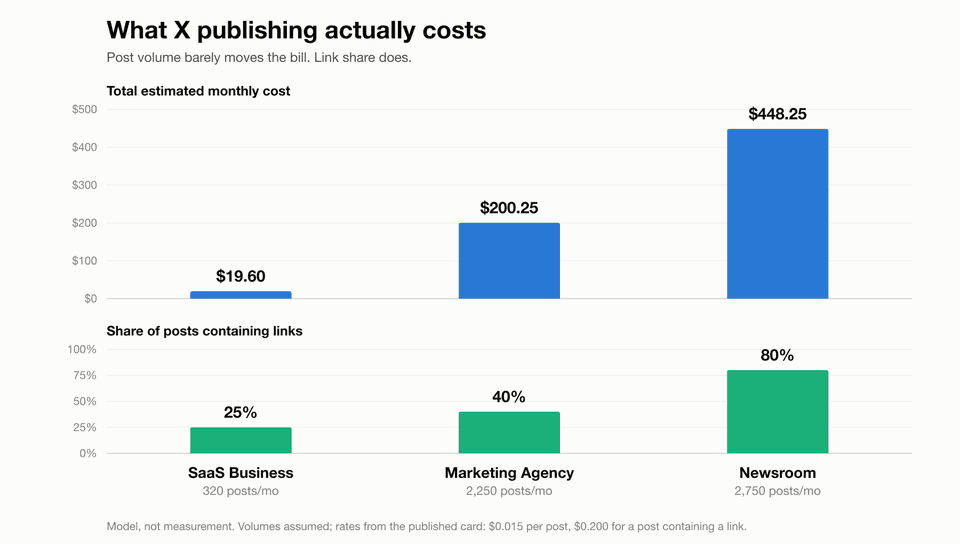
Most pricing guides stop at X's rate card and leave you to do the arithmetic. We resell X publishing through a metered wallet, so we had to turn that rate card into a price a customer can read before they commit. Ours is public:
| Action | Our metered rate |
|---|---|
| X post | $0.015 |
| X post containing a link | $0.200 |
That second row is the entire story of X pricing, and it is why per-post averages are useless. A post with a link costs 13.3× a post without one. Not 13% more. Thirteen times.
Three worked examples at those rates. These are cost models, not invoices - our metered X billing goes live on 16 August 2026, so nobody has been charged yet and we are not going to dress up projections as history. The volumes are the shapes we actually see; the arithmetic is the rate card above.
| Customer shape | Posts/mo | Share with links | Monthly cost |
|---|---|---|---|
| SaaS, one brand account | 320 | 25% | $19.60 |
| Agency, 12 client accounts | 2,250 | 40% | $200.25 |
| Newsroom, link-heavy | 2,750 | 80% | $448.25 |
Read the second and third rows against each other, because that comparison is the one that catches people out. The newsroom publishes 22% more posts than the agency and pays 124% more. Post volume barely moved. Link share doubled, and the bill did what link share told it to.
The practical consequence: if you are forecasting an X budget, the number you need is not posts per month. It is what fraction of those posts carry a URL - and that fraction is usually set by your customers' content strategy, not by anything in your control. A product decision as small as auto-appending a "read more" link to every scheduled post can multiply your X bill by an order of magnitude, and it will not show up in any capacity plan built on post counts.
Worth stress-testing against your own mix before you commit to a price. The rate card is the same for everyone; the link share is not.
When pay-per-use stops making sense
The break-even against the legacy tiers, for anyone still holding one:
- Legacy Basic at $200/month buys you the equivalent of ~13,300 link-free posts, or ~1,000 posts with links, or 40,000 post reads.
- Legacy Pro at $5,000/month is ~333,000 link-free posts or ~25,000 with links.
If you are on a legacy tier and posting mostly links, metered pricing is likely cheaper. If you are reading at volume, legacy is likely cheaper - but neither is available to new signups, so this is a migration question, not a purchasing one.
For new builds the real question is not which X tier, but whether X earns its line item at all next to platforms that do not charge per post.
So is the X API cheap in 2026? For small, write-light applications, yes. A bot that publishes a few hundred text posts can run for very little, and pay-per-use access is much easier to justify than the old fixed monthly entry price.
For link-heavy publishers and analytics products, the answer is more complicated. URL post creation, resource-based reads, user lookups, and large-scale synchronization can produce a serious bill. At that point, the main question is not whether one request is cheap. It is whether your full workload is predictable and whether your team wants to maintain the integration.
How to estimate your real X API budget
Use this process before choosing direct integration or a provider.
1. Separate writes by content type
Count:
- standard text posts,
- posts containing URLs,
- replies,
- media-related operations,
- delete or management actions.
Do not price every write at $0.015 if most of your content contains links.
2. Count resources returned, not only requests
Read pricing is often per resource fetched. A request returning 100 posts may cost based on 100 resources, not one HTTP request.
Pagination also matters. Additional pages create additional usage.
3. Add operational overhead
Include failed requests, repeated reads, reconciliation jobs, account refreshes, webhook recovery, debugging traffic, queue workers, logging, monitoring, and customer support. A 10% to 20% usage buffer is more realistic than assuming every call succeeds exactly once.
Finally, set spending controls per customer or organization. One broken loop or abusive tenant should not be able to consume the entire credit balance.
The API price is not the integration price
The official rate card covers requests to X. It does not cover the rest of the system you must build. Even posting a single tweet with media spans two API versions and two auth schemes, before anything resembling a scheduler exists.
A real customer-facing X integration usually needs:
- OAuth authorization and callback handling,
- encrypted token storage,
- token revocation and reconnection flows,
- account-to-workspace mapping,
- post creation and validation,
- media upload and processing,
- scheduling infrastructure,
- retry policies,
- idempotency protection,
- platform-aware error messages,
- rate-limit handling,
- status polling or events,
- usage metering,
- customer support tooling,
- policy and API version monitoring.
The first successful post is not the hard part. The hard part is keeping the integration working after thousands of users connect different accounts, revoke permissions, upload broken files, schedule duplicate jobs, or hit platform-specific restrictions.
This is where "the API only costs a few dollars" becomes misleading. The API bill and the engineering bill are different line items.
Building directly versus using a unified API
Direct X API integration makes sense when:
- X is the only platform your product needs,
- the workflow is narrow,
- your team is comfortable maintaining OAuth and media uploads,
- you want full control over every X feature,
- your read and write patterns are easy to forecast,
- you have time to maintain the integration.
A unified social media API makes more sense when:
- customers expect several social networks,
- the product needs scheduling and queueing,
- users connect their own accounts,
- you need one post lifecycle across platforms,
- failures must be normalized into readable statuses,
- engineering time is more expensive than the provider fee.
The calculation should include developer time. If an engineer spends even one week implementing and testing the integration, that cost may exceed months or years of infrastructure fees.
How bundle.social handles X pricing
bundle.social uses a pass-through approach for X usage.
You pay the underlying X consumption, thats it. What you get in your sub:
- hosted OAuth account connection,
- account and team mapping,
- scheduling,
- media upload references,
- queueing,
- retries and post statuses,
- cross-platform publishing,
- one API shape for X and 15+ other platforms.
A scheduled X post uses the same post endpoint as LinkedIn, Instagram, Threads, Reddit, and the other supported channels:
const response = await fetch("https://api.bundle.social/api/v1/post", {
  method: "POST",
  headers: {
    "x-api-key": process.env.BUNDLE_SOCIAL_API_KEY!,
    "Content-Type": "application/json",
  },
  body: JSON.stringify({
    teamId: "team_123",
    title: "X product launch",
    postDate: "2026-08-12T14:00:00.000Z",
    status: "SCHEDULED",
    socialAccountTypes: ["TWITTER"],
    data: {
      TWITTER: {
        text: "We shipped the thing. Here is what changed.",
        uploadIds: ["upload_hero_image"],
      },
    },
  }),
});

if (!response.ok) {
  throw new Error(`Post creation failed: ${response.status}`);
}
Your users still connect their X accounts through OAuth. The difference is that your application does not have to own the entire token, upload, scheduling, retry, and status layer.
Frequently asked questions
Is the X API free?
The current standard model is pay per use. You purchase credits and they are deducted as the API is used. Do not plan a production product around free access unless X explicitly grants it to your project.
How much does it cost to publish one post?
X currently lists $0.015 for a standard post creation request and $0.200 for a post containing a URL.
Is there a monthly read cap?
The pay-per-use plan currently has a limit of 3 million post reads per monthly billing cycle. Larger workloads require Enterprise access.
What does the 3 million cap cover?
Post reads, per monthly billing cycle, on pay-per-use. User reads, likes, mutes and blocks are billed as separate resources and writes do not consume it. Above 2M post reads there is no higher tier to buy - you are into a negotiated Enterprise arrangement, which has no published price.
Am I charged twice for reading the same post?
No, not within the same 24-hour UTC day. X deduplicates charges in that window, which is why aligning polling jobs to UTC day boundaries reduces cost without reducing coverage.
Do the xAI credits reduce my X bill?
No. They are credits toward xAI's API, scaling from 10% at $200 monthly spend to 20% above $1,000. If you do not use Grok, your effective discount is zero.
Can bundle.social remove the native X API cost?
No. X usage still has to be paid. bundle.social removes the need to build and maintain the surrounding publishing infrastructure and uses a pass-through model for X consumption.
Final recommendation
Start with a workload spreadsheet, not a pricing-page screenshot.
Estimate normal posts, URL posts, reads, users, likes, media operations, retries, and growth. Then compare that API bill with the engineering cost of owning OAuth, scheduling, queues, monitoring, retries, and platform changes.
Direct X access is a good fit for focused products with a narrow workflow. For multi-platform SaaS products, agencies, AI publishing tools, and customer-facing schedulers, the operational layer usually becomes the bigger problem.
That is exactly the problem a unified social media API is meant to remove.
