How to Automate Comment-to-DM on Instagram and Facebook
Set up comment to DM on Instagram and Facebook: one flow for every post or one campaign post, Meta's private reply rules, and the same flow through the API.
Comment to DM sends a private message to everyone who comments a keyword under your Instagram or Facebook post, for example a download link for each person who writes "GUIDE". In bundle.social one flow can cover every post on the account, including posts you published directly in Instagram or Facebook, or you can target a single campaign post.
This guide sets up the flow in the dashboard, shows the same flow through the API and lists the private reply rules Meta applies. You need a Pro or Business plan with messaging enabled for your organization, which bundle.social grants on request.
What is comment-to-DM?
Comment-to-DM is an automation that answers a public comment containing a keyword with a private reply in the commenter's inbox. A post that says "Comment GUIDE and we will send you the checklist" then delivers the checklist by itself, and nobody has to watch the comments.
One flow for every post, or one campaign post
A comment flow has an optional post setting, and that choice decides its reach:
- All posts. Leave the post empty and the flow covers every post on the account: new posts, older posts and posts published natively in Instagram or Facebook, outside bundle.social. Use it for an evergreen keyword such as "PRICE" or "LINK".
- One post. Pick a post published through bundle.social and the flow reacts only to comments on that post. Use it for a campaign with its own resource.
When both kinds exist, a matching flow for the specific post runs instead of the account-wide flow for that comment. If the post's own flow does not match, for example because the keyword differs, the account-wide flows apply, so one comment never runs both kinds.
Comments written by the account itself and replies published through bundle.social never start a flow, so your public confirmations do not trigger new runs.
Set it up in the dashboard
- Write the call to action into the post: "Want the launch checklist? Comment GUIDE and we will send you the link." The Instagram character counter checks the whole caption against Instagram's 2,200-character limit before you publish.
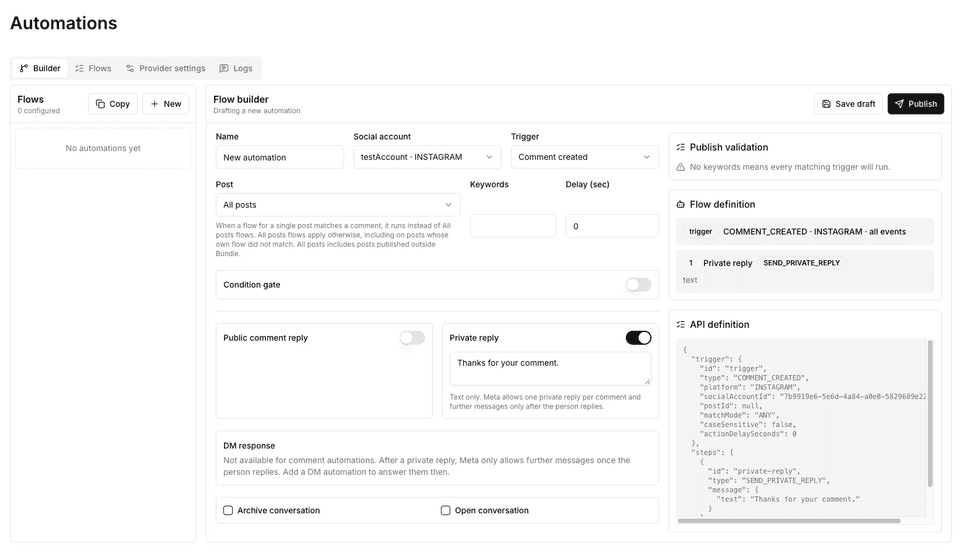
- Open Automations, stay on the Builder tab and click New. To target one post, you can instead open the post's menu on the Posts page and choose Create automation, which opens the builder with that post selected.
- Name the flow, pick the Instagram or Facebook account under Social account and set Trigger to Comment created.
- Under Post, keep All posts or choose the campaign post.
- Add the keywords
guideandchecklist. Keywords match whole words and phrases and ignore case, so "GUIDE please" matches and "guidelines" does not. Always set keywords, because without them the flow answers every comment. - Write the Private reply: "Here is the launch checklist you asked for: https://example.com/launch-checklist". Keep it plain text.
- Optionally add a Public comment reply such as "Sent you a DM!" On Facebook you can also tick Like the comment.
- Click Save draft, then Publish. A flow can go live before its post does and starts matching as soon as comments arrive.
- From a second account, comment
GUIDE. Check the private reply in the inbox or message requests, then open the Logs tab to see the run and the result of each step.
Request messaging access for your organization before the first campaign. An All posts flow picks up the keyword on the posts you have already published as well as on new ones.
bundle.social
One keyword flow covers every post on the account, including posts you published outside bundle.social.
A matching Instagram or Facebook comment gets a private reply, and the run history shows what happened next.
Same flow via API
Send this body to POST https://api.bundle.social/api/v1/automations with your x-api-key header. It is the account-wide version:
{
  "teamId": "YOUR_TEAM_ID",
  "name": "Launch checklist: GUIDE comments",
  "platformScope": "INSTAGRAM",
  "definition": {
    "trigger": {
      "type": "COMMENT_CREATED",
      "platform": "INSTAGRAM",
      "socialAccountId": "YOUR_SOCIAL_ACCOUNT_ID",
      "keywords": ["guide", "checklist"],
      "matchMode": "ANY",
      "caseSensitive": false
    },
    "steps": [
      {
        "id": "deliver-guide",
        "type": "SEND_PRIVATE_REPLY",
        "message": {
          "text": "Here is the launch checklist you asked for: https://example.com/launch-checklist"
        }
      },
      {
        "id": "confirm-publicly",
        "type": "SEND_PUBLIC_COMMENT_REPLY",
        "text": "Sent you a DM!"
      }
    ]
  }
}
To limit the flow to one campaign post, add "postId": "YOUR_BUNDLE_POST_ID" to the trigger. It takes the ID bundle.social returned when you created the post, not the Instagram media ID. The public reply runs after the private reply, so the comment says "Sent you a DM" only once the message has gone out.
The flow is saved as a draft. Publish it with an empty body:
POST https://api.bundle.social/api/v1/automations/YOUR_FLOW_ID/publish
x-api-key: YOUR_API_KEY
Content-Type: application/json
{}
To test against a real comment first, send POST /api/v1/automations/{id}/test with {"input": {"fetchedCommentId": "..."}}. The ID comes from the comment.received webhook. A test skips the keyword check and really sends the private reply, so use your own test account. The Meta automation API page covers a flow's full lifecycle, from draft and test run to execution logs.
For Facebook, create a second flow with FACEBOOK as both platformScope and the trigger's platform, and the Facebook Page's socialAccountId. Each flow watches one account.
Private reply rules
Meta sets these rules (as of November 2026). bundle.social checks the Facebook ones before sending, and the flow builder rejects steps that would break them:
| Rule | ||
|---|---|---|
| Private replies per comment | One | One |
| Which comments qualify | Comments on your posts and Reels | Top-level comments only, not replies |
| Time limit | Within 7 days of the comment | Within 7 days of the comment |
| Format | Plain text, no images, buttons or quick replies | Plain text, no images, buttons or quick replies |
| Further messages | Only after the person replies, then within 24 hours of their message | Same |
| Next automated message | Needs a separate flow with a DM received, Quick reply clicked or Button clicked trigger | Same |
A SEND_MESSAGE step cannot follow a comment trigger, because Meta allows nothing beyond the private reply until the person answers. Once they reply, a DM received flow (the Instagram DM automation guide builds one) or your own code can continue with quick replies and buttons; the Instagram Messaging API tutorial shows the API side.
Until the person answers, the conversation shows platformData.canReply: false. If your team also replies by hand, the social media inbox management guide shows how a shared inbox reads that flag and disables the composer.
Troubleshoot a flow that does not run
Check these in order:
- The organization has messaging access, and the account was reconnected with messaging permissions and has messaging enabled. A private reply is a DM, so it needs that opt-in.
- The flow is published and active, not a draft or paused.
- The comment contains the keyword as a whole word. "Guides" does not match "guide".
- No per-post flow matched the comment. When one does, the account-wide flow does not run.
- On Facebook, the comment is a top-level comment, not a reply to another comment, and it is less than 7 days old.
- The account still has automation runs left this month. Once they are used up, the Logs tab shows
AUTOMATION_MONTHLY_LIMIT_REACHED.
If a run starts and a later step fails, the private reply already sent is not undone. Execution logs are kept for 30 days.
Measure delivery and the next action separately
Track matched comments, successful private replies, failed runs, link visits and conversations that continue afterwards. Put a tracked URL in the private reply, since a delivered message is one stage of the funnel and a download or a sale is another.
Comment-to-DM in bundle.social vs ManyChat
ManyChat sets up comment-to-DM in a visual editor for one brand, billed per account by active contacts. bundle.social runs the same kind of flow from the dashboard or the API across many connected accounts in one organization, next to the publishing API that creates the campaign posts. The ManyChat alternative page compares channels and cost, and the Comment to DM API and Instagram auto reply API pages cover the product.
Frequently asked questions
Does comment to DM work on posts I published directly in Instagram?
Yes. A bundle.social comment flow with no post selected covers every post on the account, including posts published natively in Instagram or Facebook and posts created before you set up the flow. Only flows that target one specific post need that post to be published through bundle.social. The keyword and private reply rules work the same in both cases.
Can I send more than one message after a comment?
Not straight away. Meta allows one plain-text private reply per comment, and nothing more until the person writes back. Once they reply, the conversation opens for 24 hours from their latest message, and a separate DM received flow or your own code can continue with quick replies, buttons or attachments.
How many comment-to-DM replies can I send per month?
On Pro, each connected account gets 200 automation runs and 200 sent DMs a month; Business raises both to 1,000. A run that sends a private reply counts against both allowances. The Free plan includes no runs or DMs. When an account reaches its limit, runs are recorded as skipped with an error in the logs.
What happens if the same person comments the keyword twice?
They get two answers. Comment flows on Instagram and Facebook have no per-person cooldown, so every matching comment starts its own run, each with at most one private reply. If that matters for a giveaway, ask for one comment in the post copy or deduplicate in your own code using the comment.received webhook.
Does comment-to-DM work on Facebook comment replies?
No. On Facebook, Meta allows private replies only to top-level comments, and only within 7 days of the comment. A reply posted under someone else's comment will not receive a private reply, even if it contains the keyword. On Instagram, the 7-day limit applies as well, so very old comments cannot get a private reply either.