Social Media API Integration: A Practical Guide for Developers & Marketers (No Fluff)
Fifteen platforms side by side: token lifetimes, refresh models, publish flows, rate-limit models and publishing caps in one table. Then the parts that only show up in production - retry classification, the analytics mismatch, and media specs that fail a check you did not know existed.
A social media API integration is one codebase talking to fifteen platforms that agree on nothing: not on how long a token lives, not on how a post is created, not on what counts as one unit of rate limit. This guide is the map of that variance, built from the integrations we run in production, and it is written to be used in the order you will hit the problems: pick platforms, register apps, survive OAuth, keep tokens alive, respect four different rate-limit models, pass media validation, and classify errors before you retry them.
Every number below carries the date it was verified and the document it came from. Where a platform does not publish a figure, this guide says so instead of guessing.
What changed in the August 2026 update
- YouTube's upload quota was wrong here, and almost everywhere else.
videos.insertno longer costs 1,600 units from the shared 10,000-unit pool. It costs 1 unit from a separate Video Uploads bucket, capped at 100 uploads per day. The old figure produced the widely repeated "about six uploads a day", which is off by a factor of about sixteen. Corrected in the platform table and in the rate-limits section. - Scheduling was split out. The claim loop, per-organization fairness cap and duplicate protection that decide when a post fires now live in the social media scheduling API guide, linked from the sections that depend on them.
- The duplicated closing section is gone. This page had two copies of "What's Next?", one of them from a much older revision that still pointed at retired documentation links.
TL;DR
- What is it? A social media API is the secure pipe that lets your app talk to a platform - publish a post, pull analytics, react to a mention - without a human touching the platform's UI.
- How does it work? Register an app → OAuth → request scopes → call the API → receive webhooks. Five steps, and the mess lives between three and four.
- The catch: Every platform counts rate limits differently, validates media differently, and defines "engagement" differently. There are fifteen of these, not one.
- What actually breaks in production? Token expiry, media that fails a spec check you did not know existed, and retrying an error that was never going to succeed.
What is a Social Media API? (And Why You Should Care)
You've likely searched for "what is api in social media" because you're tired of copy-pasting the same image into five different browser tabs. We get it.
At its core, a social media API (Application Programming Interface) is a set of rules that allows different software applications to talk to each other. It's the engine behind social media API integration tools that let you:
- Post content automatically (write once, publish everywhere).
- Pull analytics (get all your likes and views in one dashboard).
- Listen to mentions (support bots, alerting, moderation).
Think of it like a waiter at a restaurant. You (the app) don't go into the kitchen (the platform's database) and start frying burgers. You give your order to the waiter (API request), who takes it to the kitchen, checks it's allowed, and brings back your food (response).
If you ask the waiter for a "Unicorn Burger" - a feature the platform doesn't support, like publishing to a personal Facebook profile - the waiter will just stare at you and say 400 Bad Request.
The rest of this guide is about the things nobody tells you before the waiter starts saying no.
Fifteen platforms, side by side
Here is what most integration guides never show you: how differently these APIs behave when you put them next to each other.
Verified against official documentation on 31 July 2026. Where a figure is not published, that is stated rather than guessed.
| Platform | Access token life | Refresh model | Publish flow | Rate-limit model | Publishing cap |
|---|---|---|---|---|---|
| Facebook Pages | Page token inherits from the user token | Re-derive from a long-lived user token | POST /{page-id}/feed, /photos, /video_reels | 4800 × engaged users / 24 h | Not published |
| 1 h short-lived → 60 days long-lived | grant_type=ig_refresh_token; token must be ≥ 24 h old | Container → media_publish (2 calls) | 4800 × impressions / 24 h | 100 posts / 24 h (carousel section says 50) | |
| Threads | 1 h → 60 days | grant_type=th_refresh_token; token ≥ 24 h old | Container → threads_publish | 4800 × impressions / 24 h, impressions floored at 10 | 250 posts + 1,000 replies / 24 h |
| X (Twitter) | 2 hours | Refresh token only if you requested offline.access | Media upload → POST /2/tweets | Headers + pay-per-use billing | 10,000 posts/24 h per app, 100/15 min per user |
| 60 days | Refresh token valid 365 days, non-sliding; approved partners only | initializeUpload → upload → POST /rest/posts | Not published - read your app's Analytics tab | Not published | |
| TikTok | 24 h (expires_in: 86400) | Refresh token 365 days; the clock does not reset | POST /business/video/publish/ → poll status | QPS/QPM/QPD by tier (10 / 600 / 864,000 on Basic) | 6 posts/min, 15/day per account |
| YouTube | Short-lived (expires_in; no fixed figure published) | Google refresh token, access_type=offline | Resumable upload → videos.insert | 10,000 units/day for most methods, plus separate per-method daily buckets | 100 uploads / 24 h (videos.insert costs 1 unit from its own bucket) |
| Not published | 60-day continuous refresh token, refreshable indefinitely (the 365-day legacy token was retired 25 Sep 2025) | POST /media (video) → POST /pins | Per-endpoint categories, numbers not in the spec | Not published | |
| Not in the public endpoint reference | Not in the public endpoint reference | POST /api/submit (kind: link/self/image/video/videogif) | Not in the public endpoint reference | Per-subreddit via post_requirements | |
| Bluesky | accessJwt, "expires after a few minutes" | com.atproto.server.refreshSession using the refreshJwt | uploadBlob → createRecord | Points: CREATE 3, UPDATE 2, DELETE 1, vs 5,000/h and 35,000/day | ~1,666 records/hour, 11,666/day |
| Mastodon | Tokens do not expire automatically - only deletion or revocation kills them | n/a | POST /api/v2/media → POST /api/v1/statuses | 300 req / 5 min, counted per account and per IP | Media: 30 uploads / 30 min |
| Discord | Bot token: no expiry documented. OAuth2 bearer: expires_in: 604800 (7 days) | Refresh token for bearer flow only | POST /channels/{id}/messages | Per-route buckets + global 50 req/s per bot | Per bucket, numbers not published |
| Slack | Bot (xoxb-) and user (xoxp-) tokens, each with its own scopes | Rotation exists but is not in the mirrored spec | chat.postMessage (+ file upload) | Tiered per method; tiers not in the mirrored spec | Not in the mirrored spec |
| Google Business Profile | Google OAuth 2.0, scope business.manage | Standard Google refresh token | POST /v4/accounts/{a}/locations/{l}/localPosts | 300 QPM default | 10 edits/min per profile - cannot be raised |
| Snapchat | Short-lived bearer (expires_in; we treat a missing value as 1 h) | grant_type=refresh_token on the same /login/oauth2/access_token endpoint | Encrypted chunked upload → POST /v1/public_profiles/{id}/stories or /spotlights | Not published | Not published |
Five observations that matter more than any single cell.
There is no shared unit. Meta counts a percentage of an engagement-derived allowance, YouTube counts weighted units, Bluesky counts points, Mastodon counts requests, TikTok counts queries per second, Discord counts per-route buckets, and X counts dollars. A single global counter in your code will be wrong on most of them.
Two platforms publish in two calls, not one. Instagram and Threads both use a container model: create a media container, then publish it by ID. The container expires after 24 hours and can fail asynchronously - so a 200 on the first call tells you nothing about whether the post exists. Snapchat is a third variant of the same problem: media upload and the Story/Spotlight create are separate calls, and the create keeps returning MEDIA_PROCESSING until Snap finishes transcoding.
Token lifetimes span four orders of magnitude. X gives you two hours. TikTok gives you a day. Instagram, Threads and LinkedIn give you sixty days. Mastodon tokens do not expire at all until someone revokes them. One refresh cron with one interval will not serve all of them.
"Not published" is a real answer, and it is common. LinkedIn states outright that its standard rate limits are not in the documentation and that you must read them from your app's Analytics tab - which only shows endpoints you have already called that day. Discord tells you explicitly not to hardcode limits and to parse X-RateLimit-Bucket instead. Reddit's public endpoint reference documents scopes and parameters but not tokens, rate limits, or error shapes at all. Any article quoting precise numbers for these is quoting a guess.
Snapchat makes you do the crypto yourself. It is the only one of the fifteen where you generate an AES-256-CBC key and IV, hand them to the media-metadata call, and then upload the ciphertext in multipart parts before finalizing. It is also the only one that publishes to a Public Profile rather than to an account: no public profile on the connected Snapchat account means no Story and no Spotlight, whatever your scopes say. Publishing lives on the Public Profile API at businessapi.snapchat.com, not on the ads Marketing API - a distinction most write-ups still get wrong.
How Integration Actually Works (The 5-Step Reality)

Most social media scheduling API integration guides skip the messy middle. Here is the actual flow we use in production at bundle.social.
1. Pick Your Battles (Platform Selection)
You decide which social networking API you need: Instagram Graph API, LinkedIn Posts API, X API v2, TikTok, Facebook Graph API, YouTube Data API v3, and so on.
Pick fewer than you think. Each platform is not "one more endpoint" - it is a token model, a media pipeline, an error taxonomy, and an app review, forever.
2. Create the App
You go to the developer portal (e.g. Meta for Developers), register your app, and get a Client ID and Client Secret. Treat that secret like your banking password.
While you are there, note which access level you are on. Meta's Standard Access only reaches assets your own developer account owns. Everything works in testing and then returns an empty array against a customer's Page. That is not a bug - that is the access level, and fixing it means app review. Google Business Profile goes further: if your API quota is 0, you have to apply for access before a quota increase request even makes sense.
3. The OAuth Dance (Connect)
This is the "Login with Facebook" part. You redirect the user to the platform's authorize URL with your client ID, a redirect URI, a scope list, and a state value. They click "Allow." The platform redirects back with a short-lived authorization code, which you exchange server-side for an access token.
Three details that cost people a day each:
- The authorization code is single-use and short-lived - sometimes brutally so. Threads gives you an hour and rejects the second attempt with
"Matching code was not found or was already used". X gives you thirty seconds. If your callback handler does a slow DB write before the exchange, or a double-fired redirect burns the code, you fail. stateis not optional. It is your CSRF defence and your only way to tie the callback back to the right tenant.- The redirect URI must match exactly. Trailing slashes count.
We've built a complete guide on how to connect social accounts covering both the hosted flow and a custom UI, plus a deeper reference on OAuth across social APIs.
4. Scope It Out
You don't just ask for "access." You request specific scopes (permissions).
- Good:
pages_manage_posts- let me post to your Page. - Bad:
pages_messaging- let me read your DMs. Don't ask for this unless you really need it.
Over-requesting is not just impolite; it is a common reason app review submissions get bounced. Reviewers read the scope list against your screencast, and a permission you never demonstrate sinks the whole submission.
Scopes also gate things you would not expect. Instagram's refresh endpoint requires the app to still hold instagram_business_basic. Threads requires threads_basic. X will not issue a refresh token at all unless offline.access was in the original authorize URL - and retrofitting it means re-consenting every user you already onboarded.
5. Handle the Token
If the user says yes, the platform sends you a token. You store it encrypted, keyed to the account, and send it with every future request.
Then you refresh it - which is where most integrations quietly rot.
6. Refresh the Token Before It Dies
The step nobody puts in the diagram. Here is what you are actually maintaining:
| Platform | Access token | Refresh mechanism | The trap |
|---|---|---|---|
| 60 days | GET graph.instagram.com/refresh_access_token?grant_type=ig_refresh_token | Token must be at least 24 h old to refresh. Unrefreshed for 60 days = gone, with no recovery path | |
| Threads | 60 days | GET graph.threads.net/refresh_access_token?grant_type=th_refresh_token | Same 24-hour minimum age. The refresh call does not even need the client secret |
| 60 days | POST /oauth/v2/accessToken, grant_type=refresh_token | The refresh token's 365-day TTL does not reset. On day 360 you have five days left however often you refreshed. And refresh tokens are limited to approved partners | |
| TikTok | 24 h | POST /tt_user/oauth2/refresh_token/ | Refresh token lasts a year and the clock does not restart on use |
| X | 2 h | Standard OAuth 2.0 refresh | Requires offline.access at authorize time. Refresh-token lifetime is not published |
| Not published | grant_type=refresh_token | Since 25 Sep 2025 the model is a 60-day continuous refresh token, refreshable indefinitely. The old 365-day hard-limit token is retired - older apps must opt in | |
| YouTube / GBP | Short-lived | Google refresh token | Returned only on the first authorization with access_type=offline. Lose it and you must force re-consent |
| Mastodon | No automatic expiry | n/a | The app registration itself can vanish on servers older than 4.3, and 4.4 added client_secret_expires_at |
| Discord (bot) | No expiry documented | n/a | The failure mode is a removed bot or revoked permission, not an expired token |
| Snapchat | Short-lived (expires_in) | POST accounts.snapchat.com/login/oauth2/access_token, grant_type=refresh_token | The whole integration hangs on one scope string, snapchat-profile-api. The exchange can return 200 without it, and every publish call then fails - check the returned scope at connect time, not at publish time |
Three rules fall out of that table.
Refresh on a schedule, not on a 401. LinkedIn's non-sliding window and Instagram's hard 60-day cliff both punish lazy refresh. A daily job that refreshes anything past half its lifetime costs nothing and removes an entire class of incident.
Refreshing is not the same as being authorized. LinkedIn returns 401 "The token has been revoked" when a member disconnects your app in their privacy settings. Meta returns 190 with subcode 458, 460, 463 or 467. Bluesky's refreshSession returns ExpiredToken or AccountTakedown. None of these are fixable by retrying - the user has to reconnect.
Store the failure, not just the token. When a refresh fails, the useful record is which account, which platform, and what the platform said. That is the difference between "your Instagram stopped working" and "your Instagram admin role was removed on the connected Page."
Safety First: Is It Actually Secure?
You'll hear people ask, "is api social media safe?" or worry about social media API integration risks.
The verdict: APIs are significantly safer than the alternative (sharing passwords), but safety depends on implementation.
When you use a social media integration API, you are using a token-based system (OAuth).
- No passwords: You never see or store the user's actual Instagram password.
- Granular access: Remember the scopes? You can grant permission to post content without granting permission to delete an account.
- Revocability: If a tool acts sketchy, the user revokes access in their social settings. The token dies and the app is locked out.
However, as a developer, if you leak those tokens or store them in a text file called passwords.txt (please don't), that's on you. Compliance is a shared responsibility.
Three details that turn "we use OAuth" into "we use OAuth correctly": encrypt tokens at rest with a key you can rotate; scope every credential to a tenant so one customer's token can never publish to another's account; and log token use, not token values - a token in your log aggregator is a token in your incident report.
The "Gotchas": Real Constraints Marketers Hate

We value radical transparency here. Integrating enterprise social media platform APIs isn't always sunshine and rainbows. Here are the constraints we fight daily.
Rate Limits
Platforms limit how many requests you can make. What generic articles get wrong is treating this as one problem. It is four, and they need four different implementations.
Requests per window. The obvious one. Mastodon allows 300 requests per 5 minutes, counted against your account and your IP separately. Bluesky allows 3,000 requests per 5 minutes per IP. Discord allows 50 requests per second globally per bot, on top of per-route buckets. Easy to reason about, and the only model most "API rate limiting" articles describe.
Cost-weighted quota. YouTube gives a project 10,000 units per day, resetting at midnight Pacific, and methods cost different amounts: search.list costs 100 units, most list calls cost 1. The two most expensive operations were moved out of that shared pool into their own daily buckets, and this is the number most articles still get wrong: videos.insert now costs 1 unit and is capped at 100 uploads per day, in a separate Video Uploads bucket. Verified against the quota calculator and the videos.insert reference on 25 August 2026. Two multipliers people still miss: every page of a paginated response costs the full quota again, and even an invalid request costs at least one unit.
Bluesky uses the same idea with different units: writes cost points - CREATE 3, UPDATE 2, DELETE 1 - against 5,000 points per hour and 35,000 per day, which the docs themselves work out to 1,666 records per hour.
Derived from engagement. This is Meta's model and it breaks people's mental models entirely:
Facebook Pages:  4800 × engaged users  per 24 h
Instagram:       4800 × impressions    per 24 h
Threads:         4800 × impressions    per 24 h  (impressions floored at 10)
Your allowance is a function of how popular the account is, not of what you pay. The consequence is operationally painful: a brand-new account has almost no budget, which is exactly when onboarding wants to backfill a content calendar. Threads at least sets a floor of 10 impressions, so a new account gets 48,000 calls rather than nearly zero. Facebook Pages and Instagram document no such floor.
Money. X's pay-per-use model bills per operation - $0.015 to create a post, $0.200 if it contains a URL - on top of hard caps of 10,000 posts per 24 hours per app and 100 per 15 minutes per user. The limiter is your budget and one failure mode is not a 429, it is an invoice. We modelled the numbers in X (Twitter) API pricing.
Two practical notes. Meta's X-App-Usage header returns call_count, total_time and total_cputime as percentages, 0–100 - not counts. You can sit at call_count: 12 and still be throttled because total_cputime hit 100, which happens when you request wide field sets over large edges. And Discord's X-RateLimit-Bucket is the real key: several endpoints share one bucket, and the same endpoint with a different channel_id or guild_id has an independent limit. Keying your counter on the URL path is wrong in both directions.
The full cross-platform breakdown - response headers, and how to build one limiter over four counting models - is in social media API rate limits. YouTube's quota has its own guide: YouTube API quota exceeded.
The Review Process
Before your app can go live on Instagram or TikTok, a human at those companies has to review a video of you using it. It can take weeks (or months and 43 tries, don't ask how I know). We wrote up one of ours in Meta app review in 20 days.
Review gates behaviour, not just access. YouTube forces every video uploaded via videos.insert from an unverified project created after 28 July 2020 to private until the project passes a compliance audit. TikTok's unaudited clients can only post in SELF_ONLY viewership and can only serve five users in a 24-hour window. So "it works but nobody can see it" is a documented state, not a bug worth a week of debugging.
Restricted Endpoints
Some things just aren't possible via API. Publishing to a personal Facebook profile was removed years ago and has no workaround. Group publishing is closed to new apps. Google Business Profile cannot create product posts through the API at all. Snapchat publishes only to a Public Profile - a personal Snapchat account is not a target, and the API hands back a profile permalink rather than a per-post URL, so "link me to the Story I just published" is a request you cannot fulfil. APIs lag behind the apps, and product plans that assume parity need to change before anyone writes code.
Data Retention
Platforms like Facebook have strict rules on how long you can store user data. You can't hoard analytics forever without refreshing consent, and a working data deletion callback is a hard requirement for Meta app review.
Media requirements: the constraint nobody plans for
Text posting is the easy 20%. Media is where integrations stall, because every platform validates differently, most validate asynchronously, and the error arrives minutes after your 200 OK.
Verified 31 July 2026. Blank or "not published" means the figure is not in the documentation - not that there is no limit. The Snapchat row is what our own pipeline enforces before upload: Snap's Public Profile API does not publish a media spec sheet, so those numbers come from production rather than from a docs page.
| Platform | Images | Video | Transport | Text limit |
|---|---|---|---|---|
| Instagram feed | JPEG only, 8 MB, aspect 4:5–1.91:1, width 320–1440 | Reels: MOV/MP4, H.264 or HEVC, 300 MB, 3 s–15 min, 23–60 FPS, aspect 0.01:1–10:1 | Public URL - Meta fetches it | 2,200 chars, 30 hashtags, 20 @-tags |
| Instagram Stories | as above | MOV/MP4, 100 MB, 3–60 s | as above | - |
| Threads | JPEG/PNG, 8 MB, aspect ≤ 10:1, width 320–1440 | MOV/MP4, H.264 or HEVC, 1 GB, max 300 s, 23–60 FPS, ≤ 1920 px wide | Public URL only - no byte upload documented | 500 chars; alt_text 1,000; carousel 2–20 items |
| Facebook Pages | .jpeg/.bmp/.png/.gif/.tiff, 10 MB (PNG: stay under 1 MB) | Reels: .mp4, H.264/H.265/VP9/AV1, 3–90 s, 9:16, 1080×1920 recommended | Public URL or multipart bytes; Resumable Upload API for large files | Not published |
| TikTok | JPG/JPEG/WebP, 20 MB each, up to 35 per photo post | .mp4/.mov/.webm, 1 GB, 3–600 s, min 360 px, 23–60 FPS | URL pull only, and the domain or URL prefix must be verified (since 16 Nov 2023) | Caption 2,200 UTF-16 runes, 30 mentions |
| YouTube | Thumbnail set separately | 256 GB, video/* or application/octet-stream | Resumable upload; 308 Resume Incomplete on partial | Title 100 chars, description 5,000 bytes |
| JPG/GIF/PNG, < 36,152,320 pixels (a pixel-count limit, not bytes), GIF ≤ 250 frames; MultiImage 2–20 | MP4, 3 s–30 min; the docs give both 500 MB and 5 GB | ?action=initializeUpload → PUT bytes in 4 MB parts, collect an ETag each → finalizeUpload | Not published; altText 4,086 | |
| X | 5 MB, JPG/PNG/GIF/WEBP; animated GIF 15 MB | 512 MB, 0.5–140 s, H.264 + AAC-LC, 32×32 to 1280×1024, aspect 1:3–3:1, ≤ 60 FPS | Chunked initialize / append / finalize | 280 weighted chars - emoji and CJK count 2, any URL counts 23 |
| Bluesky | 1,000,000 bytes per image, max 4 per post, per-image alt | Separate service: app.bsky.video.uploadVideo, then poll a job | uploadBlob → embed the blob ref in the record | 300 graphemes (not characters) |
| Mastodon | Instance-configurable: image_size_limit | Instance-configurable: video_size_limit, video_frame_rate_limit | POST /api/v2/media returns 200 (done) or 202 (still processing) | Instance-configurable max_characters; 500 is typical |
base64 or URL, image/jpeg and image/png | POST /media registers intent, returns an S3 upload_url; poll status | Register → S3 POST → reference media_id | Title 100, description 800, alt 500, link 2048 | |
| Discord | 10 MiB per file default (higher with Nitro/boosts, read attachment_size_limit) | as images | Multipart; whole request capped at 25 MiB | 2,000 chars; embeds 6,000 total across ≤ 10 |
| Not documented in the public endpoint reference | Not documented | kind=image|video|videogif exist but the asset-lease endpoint is undocumented | Title 300 chars, overridable per subreddit | |
| Google Business Profile | Not published | Not published | Local posts must reference media by URL - byte upload works only for location media | Not published |
| Snapchat | Story: one image | Story or Spotlight: one MP4; we enforce ≤ 100 MB, 5–180 s, min 540×960. Spotlight is video-only | POST /media with your own AES-256-CBC key + IV → multipart ADD parts → FINALIZE | Spotlight description 160 chars; a Story carries no caption |
Five things this table should change about your design.
Most platforms fetch, they do not receive. Instagram, Threads, TikTok and Google Business Profile all pull the file from a URL you supply. Your media has to live on a publicly reachable HTTPS host for the duration of the fetch - not behind basic auth, not on a signed URL that expires in 60 seconds, and for TikTok, on a domain you have verified with them. Staging environments break here first.
Validation is asynchronous. Threads returns container errors like INVALID_ASPEC_RATIO (their spelling), INVALID_FRAME_RATE, INVALID_DURATION and FAILED_DOWNLOADING_VIDEO - but only when you poll the container's status field, which Meta recommends doing once a minute for no more than five minutes. TikTok reports duration_check_failed, frame_rate_check_failed and picture_size_check_failed by webhook after the fact. Mastodon returns 202 and a null url for anything it has not finished processing. Snapchat rejects the Story or Spotlight create with error_code: MEDIA_PROCESSING until the upload has transcoded - we poll it on a 15/15/20-second cadence against a ten-minute budget. Your job queue needs a polling state, not just a request state.
Read the limits at runtime where the platform offers it. Mastodon publishes every constraint per instance under GET /api/v2/instance - statuses.max_characters, media_attachments.image_size_limit, video_size_limit, video_matrix_limit, supported_mime_types. Hardcoding 500 characters works until a customer connects to an instance configured for 5,000. Instagram exposes content_publishing_limit for the same reason.
Transcode per platform, before you queue. The same 1080p MP4 that sails into YouTube fails TikTok at 11 minutes, fails Instagram Reels at 16, fails Facebook Reels at 91 seconds, fails X at 141, and fails Snapchat at 181. Deciding this at publish time means failing at publish time.
The specs contradict themselves. LinkedIn's Videos API states a 500 MB limit in its specifications section and 5 GB in the field schema of the same document. TikTok's publish endpoint allows 600-second videos while its webhook docs describe duration_check_failed with a 60-second maximum. Instagram's rate-limit section says 100 posts per 24 hours and its carousel section says 50. When two official numbers disagree, build to the smaller one and log the actual rejection.
We handle transcoding, per-platform validation and upload transport behind one endpoint - see media upload API.
bundle.social
One API instead of fifteen. That is the whole pitch, and this guide is why.
One contract-first API to publish, schedule and measure across 15 platforms.
Error handling and retries: transient vs terminal

Here is the single most expensive mistake in this domain: retrying an error that was never going to succeed.
A blanket "retry three times with backoff" policy looks responsible and is actively harmful. It turns one permission problem into three, burns rate-limit budget producing the same failure, and on at least one platform it will duplicate your customer's post. On Discord it can get your IP banned outright: their documented invalid-request limit is 10,000 responses of 401, 403 or 429 in ten minutes, after which Cloudflare temporarily blocks you. A retry loop on a revoked token is the fastest way to hit that.
The fix is to classify every error before deciding anything. Three buckets:
| Class | Meaning | Action |
|---|---|---|
| Transient | The platform or network failed in a way that may not repeat | Retry with exponential backoff and jitter |
| Terminal | The request is wrong, forbidden, or duplicated | Fail fast, surface to the user, do not retry |
| Unknown | In neither list | Retry a bounded number of times, then alert - the unknown bucket is your backlog |
What each platform actually tells you
Most platforms document this, and some do it explicitly.
Meta splits its error reference into "wait and retry" and "fix something first." Retryable: 1 (API Unknown), 2 (API Service), 4 (Too Many Calls), 17 (User Too Many Calls), 341 (Application limit reached), 368 (Temporarily blocked). Terminal: 3, 10, 100, 190, 200–299, 506 (Duplicate Post) and 1609005 (link scrape failed). Subcodes on 190 narrow it further - 463 is an expired token you can refresh, while 492 means the user lost their role on the Page and no amount of refreshing will help.
TikTok is the most explicit platform we integrate: its post-publishing webhook documentation lists each failure reason with a retryability verdict. internal is retryable. video_pull_failed and photo_pull_failed are worth retrying if the URL is still valid. file_format_check_failed, duration_check_failed, frame_rate_check_failed, picture_size_check_failed, auth_removed and every spam_risk_* variant are not.
YouTube's own sample code ships the classification: RETRIABLE_STATUS_CODES = [500, 502, 503, 504], ten attempts, exponential backoff with jitter - and 403 quotaExceeded deliberately excluded, because your quota resets at midnight Pacific and no backoff schedule reaches it.
LinkedIn documents exactly one retryable code on the Posts API: 409 CONFLICT, "A write conflict occurred. Retry the request." Everything else in its table - INVALID_URN_TYPE, MISSING_FIELD, FIELD_LENGTH_TOO_LONG, ACCESS_DENIED, UNPROCESSABLE_ENTITY - needs a different request. It also has a nasty edge: access-token verification failures downstream return 500, not 401, so a naive "5xx means retry" rule will hammer a dead token.
Instagram's resumable upload puts a literal "retriable": false flag in the failure payload. Read it.
The normalized shape
Fifteen error taxonomies do not merge. What does merge is the decision. Every platform error we receive is flattened into one envelope before it reaches the scheduler:
{
  code: string | null;            // stable, stringified: "IG:190", "HTTP:429"
  errorMessage: string | null;    // what the platform said, for developers
  isTransient: boolean | null;    // technical hint
  retryability: "retryable" | "non_retryable" | "unknown";
  httpStatus: number | null;
  meta: unknown;                  // trace ids, subcodes, raw crumbs
  userFacingMessage: string | null; // what the customer reads
}
Two fields do the work. retryability is the only thing the queue reads. userFacingMessage is the only thing the customer reads. Keeping them separate is what lets you say "your LinkedIn connection was revoked - reconnect it here" instead of showing someone a serviceErrorCode.
Retrying is not always safe
Exponential backoff assumes the operation is idempotent. Publishing usually is not.
Reddit's /api/submit creates a new post and a single-use WebSocket on every call. A WebSocket timeout is not evidence the post failed - retrying it produces a second post. We publish to Reddit with maximumAttempts: 1 for exactly this reason: the first failure is terminal by design, and a human decides what happens next.
The same logic applies to EPIPE. A broken pipe mid-write on a POST is ambiguous - the request may have been fully received. Classifying it as blanket-retryable risks double-posting, so it belongs in the unknown bucket.
Where the platform gives you an idempotency mechanism, use it. Mastodon accepts an Idempotency-Key header on POST /api/v1/statuses and remembers it for an hour. Discord accepts a nonce plus enforce_nonce: true and returns the original message instead of creating a second one. Two platforms out of fifteen, but they are free.
Where a retry is safe, make it resumable rather than repeated. YouTube's resumable upload protocol persists a session URI, so a retry continues from the last acknowledged byte instead of re-sending a 4 GB file. Our upload step runs with a 60-minute budget, a 2-minute heartbeat so a dead worker is detected in minutes rather than at the end, and three attempts - and because the session URI is persisted, attempt two does not create a second video.
A policy that survives contact with production
- Classify first, retry second.
retryabilityis a stored field, not an inference at the retry site. - Exponential backoff with jitter. Without it, one throttled worker becomes a synchronised thundering herd across every tenant.
- Honour
Retry-Afterand Discord'sretry_after(a float, in seconds) over your own arithmetic. - Cap attempts low for publishes. We use three automatic attempts on a three-minute base interval, and up to six manual retries afterwards. If three tries nine minutes apart did not work, a fourth will not either.
- Never let a
429and a403share a code path - see the Discord ban limit above. - Fail fast on caps you cannot outwait. Instagram's rolling 24-hour publishing cap (
2207042) is not something a retry budget can beat. - Decide attempt counts in the scheduler, not at the call site. Which platforms may be retried at all is a property of the publish flow, and it belongs next to the claim that guarantees a post is picked up once. We wrote that half up in the social media scheduling API guide.
Two numbers from our own traffic justify that policy. About 7% of failed publishes are terminal - no retry schedule will ever clear them, because a revoked token or a lost page role needs a human. And for the transient remainder, the median time to success is about 3 minutes: the first automatic retry, on the first interval.
Put those together and the shape of a good retry policy falls out. Most recoverable failures recover on attempt two, which is why a three-minute base interval and three attempts covers nearly all of them. Attempts four through ten buy almost nothing, because by then you are no longer retrying transient failures - you are retrying the terminal 7% that were never going to succeed. That is the case for spending your engineering effort on classification rather than on a longer retry budget.
The Analytics Mismatch (Why Your Numbers Look Weird)
If you're looking for the best APIs for social media analytics, be warned: math is hard.
A social media analytics API returns raw data: impressions, reach, engagement rate. But every platform defines these differently.
- LinkedIn might count a view after 3 seconds.
- TikTok might count it instantly.
- Facebook might have a totally different metric called "3-second video plays."
If you are building a dashboard, you will spend a lot of time normalizing this so "engagement rate" means the same thing across the board.
The pattern that works is the same one that works for errors: normalize to a small common shape and keep the original. Ours is deliberately boring - impressions, impressionsUnique, views, viewsUnique, likes, dislikes, comments, shares, saves - with the untouched platform payload stored alongside it rather than inside it. The normalized columns are what dashboards chart. The raw payload is what you reach for when a customer asks why one number differs from the native app, and it is the difference between "our numbers are different" and "here is exactly which metric the platform returned." The field-by-field mapping, and the list of metrics that have no counterpart on a given platform, is in the social media analytics API guide.
Also worth knowing before you promise a real-time dashboard: analytics are not free. Pulling them consumes the same rate-limit budget as publishing, on the same counters. We refresh profile and post analytics on a 24-hour interval with five forced refreshes per team per day, because polling twelve platforms hourly for every account is how you spend your entire quota on charts nobody is looking at. Note that the analytics surface is narrower than the publishing one: we publish to fifteen platforms and read analytics from twelve.
A Concrete Example: How It Looks in Code
Let's say you want to publish to LinkedIn from Node.js. The logic is the same in PHP, Ruby, or anything else.
Two things about this example are worth flagging, because most tutorials still get them wrong. The endpoint is /rest/posts, not the legacy /v2/ugcPosts - the old API used a deeply nested specificContent object that no longer applies. And both version headers are mandatory: without X-Restli-Protocol-Version, LinkedIn silently falls back to Rest.li 1.0 and your payload shape is wrong.
// 1. The setup - Posts API, not the legacy UGC endpoint
const endpoint = "https://api.linkedin.com/rest/posts";
const accessToken = process.env.LINKEDIN_ACCESS_TOKEN;

// 2. The payload - flat fields, not the old specificContent nesting
const postData = {
  author: "urn:li:person:12345",          // or urn:li:organization:12345
  commentary: "Hello world, posted via the API.",
  visibility: "PUBLIC",
  distribution: {
    feedDistribution: "MAIN_FEED",
    targetEntities: [],
    thirdPartyDistributionChannels: [],
  },
  lifecycleState: "PUBLISHED",
  isReshareDisabledByAuthor: false,
};

// 3. The execution - both version headers are required
const response = await fetch(endpoint, {
  method: "POST",
  headers: {
    Authorization: `Bearer ${accessToken}`,
    "Content-Type": "application/json",
    "LinkedIn-Version": "202601",           // YYYYMM, required
    "X-Restli-Protocol-Version": "2.0.0",   // required
  },
  body: JSON.stringify(postData),
});

// 4. The result - classify, don't blanket-retry
if (response.ok) {
  console.log("Posted:", response.headers.get("x-restli-id"));
} else {
  const body = await response.json();
  // 409 CONFLICT is the only retryable code LinkedIn documents on this endpoint
  const retryable = response.status === 409 || response.status === 429;
  console.error(body.serviceErrorCode, body.message, { retryable });
}
That is one platform, one media type, and the happy path. Adding an image means calling POST /rest/images?action=initializeUpload, PUT-ing the bytes to the returned uploadUrl, and referencing the image URN in content.media.id. Adding video means splitting the file into 4 MB parts, uploading each one, collecting an ETag per part, and calling finalizeUpload with the parts in order. The full walkthrough is in LinkedIn posting API.
Now multiply that by fifteen.
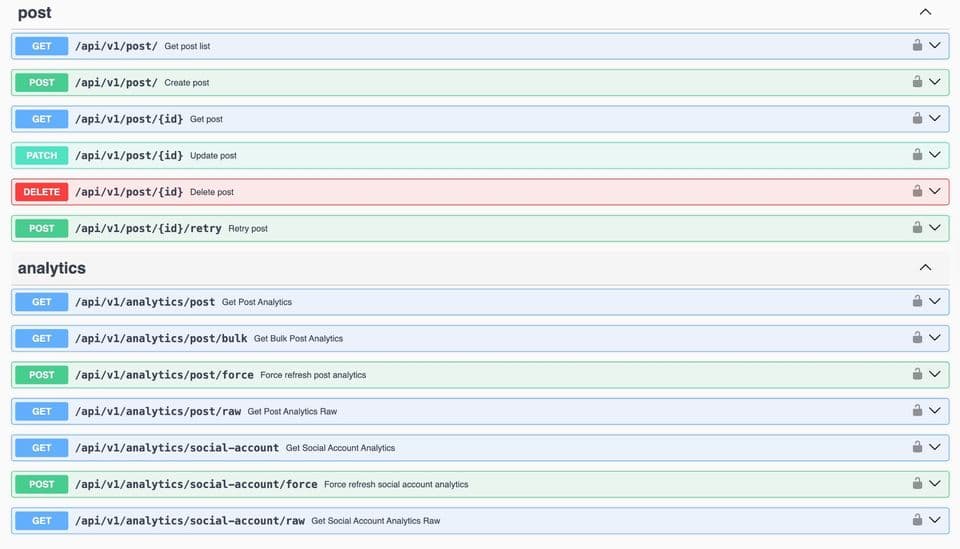
Our API: Post and Analytics Endpoints
Here's the same job against a unified API. One call, any subset of the platforms, with per-platform overrides where you need them:
curl -X POST "https://api.bundle.social/api/v1/post" \
  -H "x-api-key: ${BUNDLE_API_KEY}" \
  -H "content-type: application/json" \
  -d '{
    "teamId": "team_123",
    "title": "Launch announcement",
    "status": "SCHEDULED",
    "postDate": "2026-08-14T09:00:00Z",
    "socialAccountTypes": ["LINKEDIN", "INSTAGRAM", "THREADS"],
    "data": {
      "LINKEDIN":  { "text": "We just shipped webhook retries." },
      "INSTAGRAM": { "text": "We just shipped webhook retries.", "type": "POST", "uploadIds": ["upl_1"] },
      "THREADS":   { "text": "We just shipped webhook retries." }
    }
  }'
Media goes through /api/v1/upload (or /upload/from-url, or /upload/init + /upload/finalize for large files) and is referenced by ID, so one asset is transcoded once and validated against every target platform's specs before anything is queued. Post state changes come back as webhooks - post.published, comment.published, social-account.updated - so you are not polling us either.
The API is contract-first with full CRUD on posts plus profile and post analytics, and our own rate limits are published rather than implied: 100 requests/second burst, 500 per 10 seconds, 2,000 per minute - enforced as three concurrent windows, so a request must pass all three.
For scale: we publish around 10 million posts a month across 15 platforms, with roughly 97% succeeding on the first attempt. The remaining 3% is the subject of most of this article - and the reason the retry, classification and token-refresh machinery above exists at all. None of it is interesting until it is the difference between 97% and something a customer notices.
Go deeper: the per-platform guides
This page is the map. Each platform has its own terrain, and each guide below is written the same way - real requests, real responses, and the parts that only show up in production.
Meta. Facebook Graph API covers nodes, edges, batching and the full error-code table; Facebook Page access tokens covers the permanent-token pattern. Landings: Facebook API, Instagram API, Threads API. For Instagram video specifically, Instagram API: upload video; for review, Meta app review in 20 days.
LinkedIn. LinkedIn posting API for the Posts API, image and video upload, and the UGC migration; posting to profiles vs company pages for the permission split. Landing: LinkedIn API.
X (Twitter). X (Twitter) API pricing for what pay-per-use actually costs at your volume. Landing: X API.
TikTok and YouTube. TikTok API: upload video, TikTok API integration cost, YouTube API upload guide and YouTube API quota exceeded. Landings: TikTok API, YouTube API. Three-way comparison: TikTok vs Instagram vs YouTube APIs.
The rest. Reddit API, Pinterest API, Bluesky API, Mastodon API, Discord API, Slack API, Snapchat API - with Snapchat Story API for the Story surface specifically - and Google Business Profile API.
Cross-cutting. Social media API rate limits for the four counting models. Social media scheduling API for the claim loop, fairness caps and duplicate protection that decide when a post fires. Social media OAuth API for token lifecycle in one place. Media upload API for transcoding and transport. Social media webhooks API for events instead of polling. Social media posting API and unified social media API for the product surface, with social media API as the overview.
Architecture. If you are building this for other people's accounts, multi-tenant social media API architecture and social media API mistakes are the two we send people to most often.
What's Next?
Now that you understand how to integrate a marketing platform with social media APIs, you have two choices.
1. The DIY Route
Go read the documentation for Facebook, Instagram, LinkedIn, X, TikTok and YouTube. Handle the OAuth tokens, four rate-limit models, fifteen media spec sheets, and fifteen error taxonomies. Then maintain it - every number in this article has changed at least once in the last two years, and two of them contradict themselves today.
That is a real option, and for one or two platforms it is often the right one. Just budget for the maintenance rather than the build.
2. The Smart Route
Use a unified API that already absorbed the fifteen-way variance.
If you are a developer looking for social media API integration best practices, check out our examples on GitHub, or use our TypeScript SDK to skip the boilerplate entirely.
Frequently asked questions
How long does it take to integrate one social media API?
For a single platform with text-only publishing, a working prototype takes days. Production readiness takes longer, and the long pole is almost never the code - it is app review. Meta, TikTok and YouTube all require human review before you can serve accounts you do not own, and rejections are normal. Budget weeks, and build against your own test assets in the meantime.
Which social media APIs are free?
Most are free to call, including Meta's Graph API, LinkedIn, TikTok, YouTube (within a 10,000-unit daily quota) and the fediverse platforms. X is the exception: it moved to pay-per-use with no free tier, at $0.015 per post created and $0.200 if the post contains a URL. The real cost everywhere else is engineering time and review cycles, not invoices.
Why does my post return 200 but never appear?
Because on several platforms a 200 only acknowledges the request, not the publish. Instagram and Threads return a container ID that you publish separately, and the container can fail asynchronously - poll its status field. TikTok returns a publish ID and reports the outcome by webhook. Mastodon returns 202 while media is still processing. YouTube forces uploads from unaudited projects to private. Always read the post back, or wait for a terminal state, before telling a customer it went out.
How should I handle rate limits across multiple platforms?
Do not build one counter. Model each platform as a budget with its own unit - requests, weighted units, points, percent, or dollars - behind a single canSpend(platform, account, cost) interface. Track per account rather than per app, because Meta's engagement-derived allowance means two customers on the same app have completely different ceilings. Reconcile against response headers where they exist, and treat your local count as an estimate between calls.
What is the difference between an OAuth access token and a refresh token?
The access token authorizes API calls and is deliberately short-lived - two hours on X, 24 hours on TikTok, 60 days on Instagram, Threads and LinkedIn. The refresh token exchanges for a new access token without the user re-consenting. Two traps: some platforms only issue a refresh token if you asked for it up front (offline.access on X, access_type=offline on Google), and LinkedIn's refresh-token TTL does not reset when you use it, so a full re-authorization is inevitable after 365 days.
Should I build my own social media API integration or buy one?
Build if you need one or two platforms, own the domain expertise, and can staff the maintenance - these APIs change under you. Buy once you need four or more, or once multi-tenancy enters the picture, because the cost is not the first integration but the twelfth error taxonomy and the third app review. We wrote up the trade-off honestly in build vs buy.
